
|

|

|
Trending
- Xiaomi 18 Pro Max Transparent Edition Review: 200MP LOFIC & 8500mAh
- iQOO 16 Review: 2K 165Hz Screen, Q4 Ray Tracing & 8400mAh Battery
- Ultimea Poseidon M70 Review: Is This 312W 3.1.2 Dolby Atmos Soundbar Worth It?
- Vidda C5 Pro Review: A 4K Triple-Laser Projector Built for Movies and 240Hz Gaming
- iScooter K4 Kids Electric Scooter Review: A Compact 150W Scooter With Adjustable Speed
- KOOTAI F04 Bell 206 Review: A 2.4GHz Single-Rotor RC Helicopter With 6-Axis Stabilization
- Huawei Mate XT 2 Review: Kirin 9050 Pro Meets a Dual-Wing Design
- 18650 vs Built-In Battery Vape Mods: What’s the Difference?

 |
 |
 |
 |
 |
 |
- Shop
- 3D Printer
- TRONXY Moore 2 Pro 3D Printer
TRONXY Moore 2 Pro 3D Printer
Offers
-
 TRONXY Moore 2 Pro 3D Printer
$769
TRONXY Moore 2 Pro 3D Printer
$769
View Offer
-
Highlights
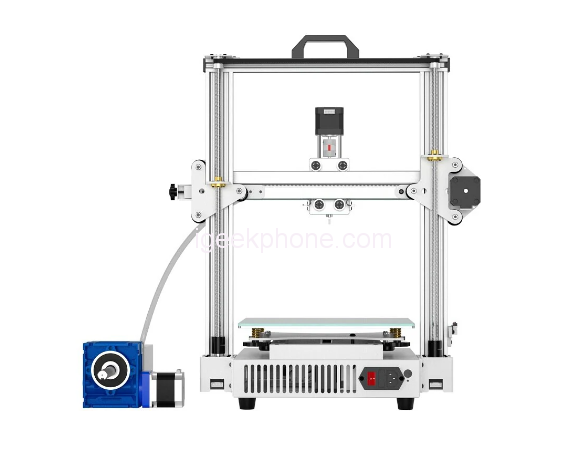
Innovative Clay 3D Printer
TRONXY Moore 2 Pro uses an electric putter instead of compressed air guarantees outstanding printing quality and stability for prints. It is able to print clay, ceramics slurry, red porcelain, and various liquid-flowing materials, just to provide you with a better print experience.Stable OSG Dual Core Guide Rail
For more stable printing, Moore 2 Pro is designed with the exclusive OSG dual-core guide rail, which can offer stable printing, high precision, and extended service life.Super Silent
Adopting a 32-bit silent mainboard and a newly designed screw feeding system, Moore 2 Pro can provide you silent printing effect, letting you enjoy the printing.Large Print Size
Moore 2 Pro features a 255*255*260mm large print size, which can fully meet your creative need.Resume After Power Failure
It is bootable to continue printing if stop the task or occur unexpected power failure during printing.Easy to Use
The full-color touchscreen interface is intuitive, lets you control the machine, and level the printing bed easily to help beginners and professionals alike get started fast.
Reviews
Sorry, you have not permission to write review for this product.
Disclaimer Note
You can write your own disclaimer from APS Settings -> General -> Disclaimer Note.
New Arrivals



ADVERTISE



