
|

|

|
Trending
- Xiaomi 18 Pro Max Transparent Edition Review: 200MP LOFIC & 8500mAh
- iQOO 16 Review: 2K 165Hz Screen, Q4 Ray Tracing & 8400mAh Battery
- Ultimea Poseidon M70 Review: Is This 312W 3.1.2 Dolby Atmos Soundbar Worth It?
- Vidda C5 Pro Review: A 4K Triple-Laser Projector Built for Movies and 240Hz Gaming
- iScooter K4 Kids Electric Scooter Review: A Compact 150W Scooter With Adjustable Speed
- KOOTAI F04 Bell 206 Review: A 2.4GHz Single-Rotor RC Helicopter With 6-Axis Stabilization
- Huawei Mate XT 2 Review: Kirin 9050 Pro Meets a Dual-Wing Design
- 18650 vs Built-In Battery Vape Mods: What’s the Difference?

 |
 |
 |
 |
 |
 |
- Shop
- 3D Printer
- SUNLU S8 PRO FDM 3D Printer
SUNLU S8 PRO FDM 3D Printer
Offers
-
 SUNLU S8 PRO FDM 3D Printer
$399
SUNLU S8 PRO FDM 3D Printer
$399
View Offer
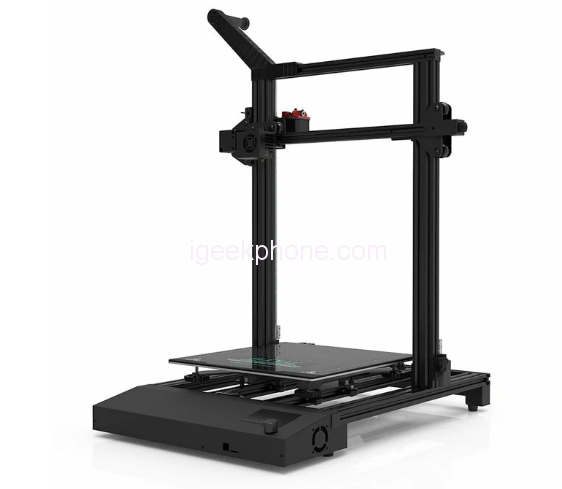
*:Removable magnetic build surface plate: provides all-round protection for the building plate of your 3D printer and ensures an even temperature across the entire building plate. This surface is easy to remove and flexible. Simply print on the surface, remove the top magnetic surface from the bottom, bend the flexible surface and watch the model fall right into your hands.
*:High-precision dual Z-axis higher pressure precision: with a Z-axis dual worm + Z-axis dual motor design, S8 PRO 3D printer works smoother and more synchronous to reduce the possibility of lines and burrs on the sides of your print, improving the print quality.
*:Double protection& no fear of risks: S8 Pro FDM 3D printer has the function to detect filament outlet or break/power failure and resume the print after recovery. By accurately recording the print data at the time of power failure/filament leakage or breakage, it helps to avoid wasting filaments and time from accidents.
*:Quick Assembling: 96% of the printer housing are pre-installed, maintenance of the printer is simple and easy. Not only for quick assembly for experienced users, but also for friendly use for beginners. With a print volume of 310 x 310 x 400 mm, you can print models that 90% of other printers can’t.
Reviews
Sorry, you have not permission to write review for this product.
Disclaimer Note
You can write your own disclaimer from APS Settings -> General -> Disclaimer Note.
New Arrivals



ADVERTISE



