|

|
Trending
- Ulefone Armor 35 Pro: Rugged Smartphone Combines a 1,200m Laser Rangefinder, 800-Lumen Camping Light and 11,000mAh Battery
- Elon Musk Pledges Two SpaceX Shares for Every US Child, Promises Annual Stock Donations
- Xiaomi AI Glasses 2 May Launch in December With a New Display Edition
- Vaporesso History: How the Vape Brand Grew, the Challenges It Faced, and How It Adapted
- Xiaomi Ends Software Support for 7 More Phones, Including Xiaomi 12S and MIX Fold 2
- Lenovo ERAZER EX216 Review: One Charging Case, Two Earbud Styles and 24-Hour Playback
- DV302 4K Digital Camera Review: Is This 64MP Flip-Screen Camcorder a Good Choice for Beginner Vloggers?
- 12GO 98003 KV-2 Heavy Tank Building Set Review: A 2,235-Piece WWII Soviet Military Model

 |
 |
 |
 |
 |
 |


- Shop
- Accessories
- Guudgo 4K 4MP 8MP WiFi PTZ EU Camera
Guudgo 4K 4MP 8MP WiFi PTZ EU Camera
-
Processor
-
RAM
-
Storage
-
Display
-
Camera
-
Operating System
Offers
-
 Guudgo 4K 4MP 8MP WiFi PTZ EU Camera
$44.99
View Offer
Specification:
Brand: Guudgo
Resolution: 4K/8K
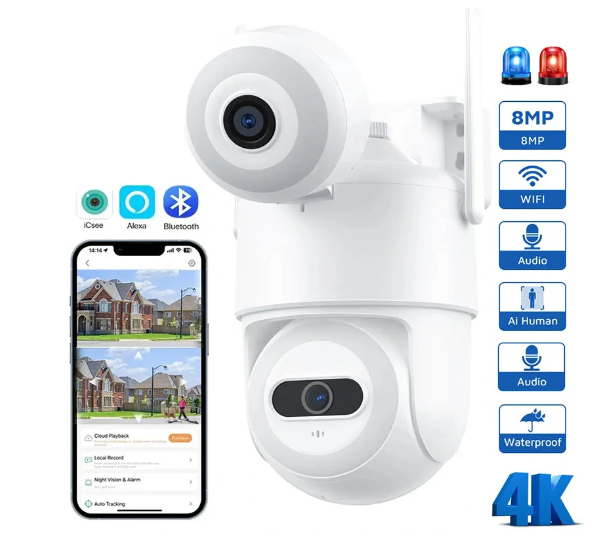
Camera System: Dual-lens camera system, comes with two 3.6mm lenses
Night Vision: 20-25 meters, Black & White modes
Connectivity: 2.4Ghz WiFi/bluetooth/Wired
Waterproof: IP66
TF Card: Accommodates up to 128G
Features:
1. High Resolution: With the choice of 4MP or 8MP resolution, this camera captures sharp and clear images.
2. Dual Screens: The dual-lenses with dual screens feature gives a comprehensive and detailed view of the surroundings.
3. AI Human Detection: Built-in AI technology alerts you whenever it detects human movement in its field of view.
4. Two-Way Audio: The camera’s integrated speaker and microphone allow for real-time two-way communication.
5. Weatherproof: Rated as IP66, this camera is dust tight and protected against heavy seas or powerful jets of water, making it ideal for outdoor installation.
Package Include:
1x Dual Screens Camera
1x User Manual
1x Power Supply(EU)
1x Screws Bag
1x Waterproof Lid
Reviews
Sorry, you have not permission to write review for this product.
Disclaimer Note
You can write your own disclaimer from APS Settings -> General -> Disclaimer Note.
More Products from Huawei


New Arrivals



ADVERTISE