
|

|

|
Trending
- Hyper Bar LX 65K Review: Features, Battery, Flavor Options and 65,000-Puff Capacity
- Huawei Mate 90 Pro Max May Feature a 200MP Zoom Camera and New External Lens System
- Xiaomi Adds 8 More Devices to the HyperOS 4 Beta Testing Program
- UK Vaping Products Duty Begins October 1 After IVG Parent Company Gets HMRC Approval
- Maskking Super GTS+ Vape Review: Exploring Its Two-Tank Setup and 10K-Puff Capacity
- JNR Bykux 59K Vape Review: 59K-Puff Capacity, Dual Mesh Coils and Adjustable Airflow
- Rock Me Sheesha Max 200K Review: 200K Puffs, 1000mAh Battery and Mesh Coil
- Fifty Bar Air 70K Review: 70,000 Puffs, ECO/BOOST Modes and 18mL E-Liquid

 |
 |
 |
 |
 |
 |
- Shop
- 3D Printer
- SCULPFUN G9 Laser Engraver
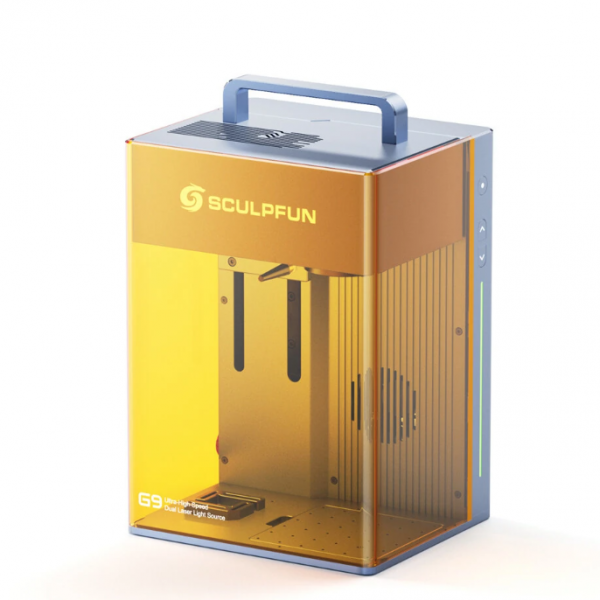
SCULPFUN G9 Laser Engraver
Offers
-
 SCULPFUN G9 Laser Engraver
$1,499
SCULPFUN G9 Laser Engraver
$1,499
View Offer
-
Specification:
Product Name: Sculpfun G9
Model: G9
Laser Power: 1064nm: 2W 455nm: 10W
Laser Wavelength: 455nm & 1064nm
Spot Size: 0.01mm
Marking Speed:
Infrared laser 2W: 5000mm/s Blue laser 10W: 4000mm/s
Processing Material Types: metal, plastic, wood, leather, acrylic, stone, ceramic, glass, paper (300+ materials)
Engraving Area: 105*105mm
Repeated Positioning Accuracy: 0.0001mm
Focus Operation: Electric lift
Support System: Android / iOS / Windows
APP: SGD Laser / Lightburn
Support File Format: SVG / DXF / JPG / JPEG / PNG / BMP
Working Voltage: DC12V
Working Current: 9A
Input Power: 108W
Connection Method: WIFI / USB
Machine Size: 230*195*321mm
Machine Weight: 7.2kg
Box Package Size: 297*247*478mm
Logistics Box Size: 320*260*495mm
Package Weight: about 10.7kg
Package Included:
Sculpfun G9*1
Throat Hoop*1
Flange*1
Exhaust Duct*1
Power Supply: adapter*1+connection cable*1
USB Cable*1
USB Security Key*1
Material Clamp*2+Hand Screw*2
Free Materials: wood board*2+dog tag*2
Tool Accessory Kit (screwdriver*1+screws*6)
U Disk*1
Manual*1
Ruler*1 (300mm)
Coherent Paper*5 (210*210mm)
Goggles*1
Focusing Sheet*5 (86x54x0.2mm)
Reviews
Sorry, you have not permission to write review for this product.
Disclaimer Note
You can write your own disclaimer from APS Settings -> General -> Disclaimer Note.
New Arrivals
ADVERTISE



