
|

|

|
Trending
- GravaStar V75 Pro Review: An 8KHz Hall-Effect Keyboard Built for Fast Competitive Gaming
- JJRC C8845 Review: A Compact 1/24 4WD RC Drift Car With Gyro and Proportional Control
- Back Market Just Made “Buying New” Feel a Little Old-Fashioned
- Aigo CJ339 Open-Ear Headphones Review: Bluetooth 6.0 and Earclip Design
- FUMOT ECO 4-in-1 80K Disposable Vape Review: Features and Flavors
- JNR Lion King Shisha 65K Review: 35ml Capacity, Adjustable Airflow and Mesh Coil
- MerryMi Blade 30K Review: Adjustable Power, Dual Mesh and 30K Puff Rating
- Samsung Galaxy Tab S12+ Renders Leak: Dimensity 9500 Chip and 10,600mAh Battery

 |
 |
 |
 |
 |
 |
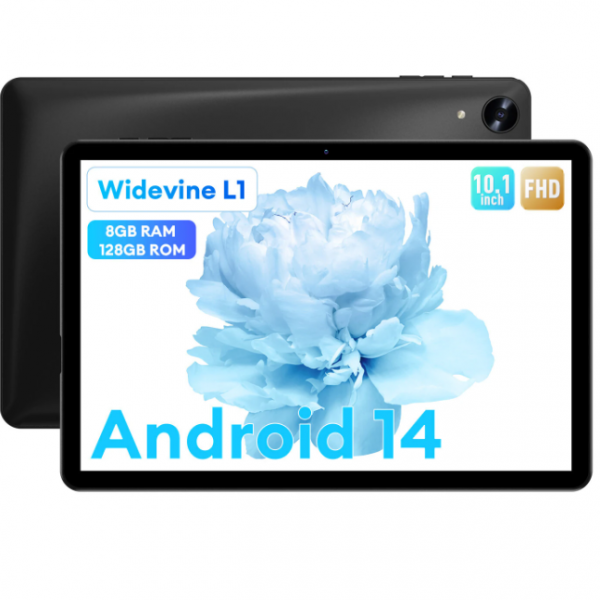
HEADWOLF WPad 5 Tablet PC
-
Processor
-
RAM
-
Storage
-
Display
-
Camera
-
Operating System
Offers
-
 HEADWOLF WPad 5 Tablet PC
$94.99
HEADWOLF WPad 5 Tablet PC
$94.99
View Offer
| Basic | |
| Model | HEADWOLF WPad 5 |
| CPU | UNISOC T606 |
| GPU | ARM Mali G57 |
| Core | Octa Core |
| System | Android 14 |
| Language | Multi-language |
| RAM | 4GB+4GB virtual memory |
| ROM | 128GB |
| Screen | 10.1 Inch IPS In-Cell Screen |
| Resolution | 1920*1200 |
| Camera | Front is 5MP Rear is 8MP |
| Battery | 3.8V 5500mAh |
| Weight | 500g |
| Size | 246.1*162.8*10.2mm |
| Function | |
| WIFI | 802.11 ac/a/b/g/n 2.4GHz/5GHz |
| bluetooth | 5.0 |
| OTG | Support |
| GPS | Support GPS+BDS+GALILEO |
| G-sensor | Support |
| 4G | Not Support |
| Frequency | NO |
| Audio & Video | |
| Microphone | Built-in |
| Speaker | Built-in |
| Audio | MP3/WMA/WAV/AAC/FLAC/APE |
| Picture | JPG/BMP/PNG |
| Video | MPEG4/H.264/HEVC 1080P |
| Connectivity | |
| I/O Port | 1 x Type C port |
| 1 x 3.5mm earphone port | |
| 1 x Micro SD slot(Maximum support 2TB) | |
| Package Included | |
| Package Included | 1 x HEADWOLF WPad 5 Tablet PC |
| 1 x Charger | |
| 1 x Adapter (the adapter depends on the country of the buyer) | |
Specs
General
Display
Hardware
OS
Network
Camera
Other Features
Dimensions and Weight
Battery
Reviews
Sorry, you have not permission to write review for this product.
Disclaimer Note
You can write your own disclaimer from APS Settings -> General -> Disclaimer Note.

New Arrivals




ADVERTISE



