|

|
- Lenovo ERAZER EX216 Review: One Charging Case, Two Earbud Styles and 24-Hour Playback
- DV302 4K Digital Camera Review: Is This 64MP Flip-Screen Camcorder a Good Choice for Beginner Vloggers?
- 12GO 98003 KV-2 Heavy Tank Building Set Review: A 2,235-Piece WWII Soviet Military Model
- M42 Smartwatch Review: Can NFC, AI Voice Assistance and Bluetooth Calling Make It a Better Everyday Wearable?
- LDRC LD1297 1:14 RC Pajero Review: A Classic Off-Road SUV Built for Scale Crawling
- How to Compress Videos on Your Smartphone Without Losing Too Much Quality?
- 8 most common transmission issues and how to resolve them
- How to Perform Vape Tricks: Beginner Techniques and Advanced Cloud Effects

 |
 |
 |
 |
 |
 |


- Shop
- Accessories
- XGIMI Mogo Pro+ Projector
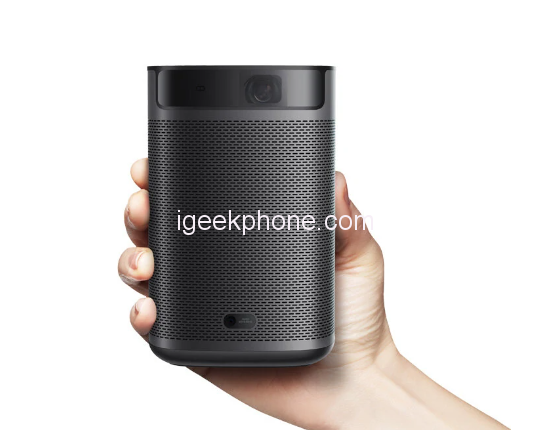
XGIMI Mogo Pro+ Projector
-
Processor
-
RAM
-
Storage
-
Display
-
Camera
-
Operating System
Offers
-
 XGIMI Mogo Pro+ Projector
$529.99
View Offer
Description:
Small and Clear
1080p Full HD resolution from such a small product — you no longer have to choose between a portable projector and high resolution. XGIMI advanced autofocus technology ensures that the projected image is always clear and bright.
Small and Smart
XGIMI MoGo Pro+ comes with XGIMI’s latest Auto Keystone Correction feature — you can get a rectangle image in seconds from side projection.
Fast and Accurate
It’s equipped with XGIMI’s exclusive eagle-eye perception system, which provides imperceptible autofocus and multi-angles auto keystone correction functions.
Small and Incredible
XGIMI MoGo Pro+ is powered by Harman-Kardon dual-speaker. The sound is professionally tuned by Gold Ear Lab, meaning the MoGo Pro+’s speaker is well balanced and perfect for any kind of music. You can also use it as an external Bluetooth speaker via Bluetooth or 3.5mm Audio Cable.
Small and Light
The body is only 14.7cm (5.8 inch) high, and the net weight is 0.9kg (1.98lbs). Like the size of a water bottle, which does not take up much space and can be easily put into the bag.
Unobtrusive Auto Focus
MoGo Pro+ will quickly autofocus when it’s turned on or moved — it can keep the picture clear at all times.
Reviews
Sorry, you have not permission to write review for this product.
Disclaimer Note
You can write your own disclaimer from APS Settings -> General -> Disclaimer Note.
New Arrivals



ADVERTISE