
|

|
Trending
- ARGUS G3 Mini vs SP2S SEN X: Which Pod Kit Wins in 2026?
- FC 26 Coins: Buy FC26 Coins Cheap & Safely in 2026
- Cloud King CK50000 Disposable Vape Review-Massive Puff Count Meets Modern Technology
- Air Factory 50K Disposable Vape Review-Long‐Lasting Performance with American Made Quality
- Rendering images of Xiaomi 18 Pro smartphone have been Released: A new AI button has been added, which can control cars / smart home devices.
- Does online job allow you to earn money?
- What to Know About Rollers.io and Its Operators?
- How Mobile Phones Have Revolutionized Online Casinos

 |
 |
 |
 |
 |
 |
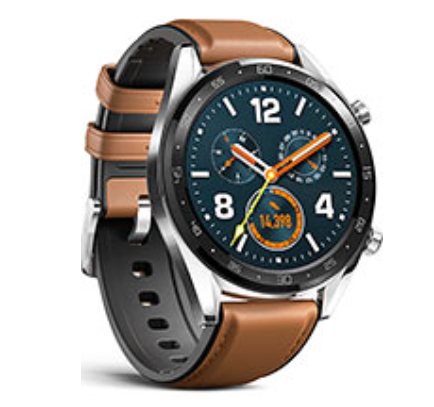
Huawei Watch GT 6
Offers
-
 Huawei Watch GT 6
View Offer
Huawei Watch GT 6 Specifications
| BASIC INFO | |
| Brand | Huawei |
| Model | Watch GT 6 |
| Status | Coming soon |
| Release date | 2025, September |
| BODY | |
| Dimensions | 46 x 46 x 10.9 mm |
| Weight | 37 g (1.31 oz) |
| Colors | Black, Steel, Silver, Gold |
| Body Material | Glass front, plastic back, stainless steel frame |
| SIMs | No |
| Water/Dust | 50m water resistant 5 ATM Compatible with standard 22mm straps (46mm model), 20mm straps (42mm model) |
| DISPLAY | |
| Size | 1.53 inches |
| Type | AMOLED |
| Resolutions | 466 x 466 pixels |
| PPI | 326 ppi density |
| Multi-touch | Yes |
| Protection | No |
| NETWORKS | |
| 2G | N/A |
| 3G | N/A |
| 4G | N/A |
| Speed | No |
| CAMERA | |
| Rear | No |
| Front | No |
| HARDWARE | |
| YOU | HarmonyOS 6.0 |
| Chipset | No |
| CPU | No |
| RAM | No |
| Internal | No |
| Card Slot | No |
| BATTERY | |
| Type | Li-Po |
| Capacity | 455 mAh |
| Removable | Non-Removable |
| Fast Charging | Wireless charging |
| Wireless Charging | Yes |
| COMMONS | |
| Sound | Loudspeaker Yes 3.5mm Jack No |
| Sensors | Accelerometer, gyro, heart rate, barometer, compass, SpO2, thermometer (body temperature) |
| Bluetooth | 5.3, LE, EDR |
| Positioning | GPS (L1+L5), GLONASS, BDS, GALILEO, QZSS |
| USB | No |
| Wi Fi | No |
Reviews
Sorry, you have not permission to write review for this product.
Disclaimer Note
You can write your own disclaimer from APS Settings -> General -> Disclaimer Note.

New Arrivals


ADVERTISE



