
|

|
Trending
- OneOdio Studio Max 2 Review – DJ Freedom Without the Wireless Compromise
- MAXRAY RUSH 80K Review – More Than Just a Puff Count: Meet the Disposable That Controls Its Own E-Liquid
- Vidda C5 Pro Review: A 4K Projector for Home Cinema and Gaming
- iBUYPOWER AI Halo Mini PC Debuts With Ryzen AI Max+ PRO 495
- Honor WIN 2 Gaming Phones and Tablet Expected to Debut in October
- UK Cryptocurrency Adoption Grows as More Britons Invest in Digital Assets
- Redmi Phone Storage Full? How to Safely Remove Junk Files
- C48Pro Smartwatch: What Can You Do on a 2.01-Inch Screen?

 |
 |
 |
 |
 |
 |
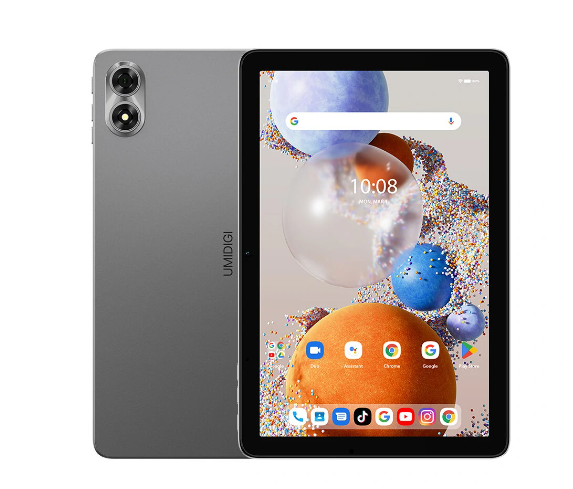
UMIDIGI G1 TAB
-
Processor
-
RAM
-
Storage
-
Display
-
Camera
-
Operating System
Offers
-
 UMIDIGI G1 TAB
$109.99
UMIDIGI G1 TAB
$109.99
View Offer
| Basic | |
| Model | UMIDIGI G1 TAB |
| CPU | Rockchip RK3562 |
| GPU | ARM G52 |
| Core | Quad Core |
| System | Android 13 |
| Language | Multi-language |
| RAM | 4GB+4GB virtual memory |
| ROM | 64GB |
| Screen | 10.1 Inch IPS Screen |
| Resolution | 1280*800 |
| Camera | Front is 8.0MP Rear is 8.0MP |
| Battery | 3.8V/6000mAh |
| Weight | 576g |
| Size | 244.8*162.2*9.3mm |
| Function | |
| WIFI | 802.11 ac/a/b/g/n 2.4GHz/5GHz WIFI 6 |
| bluetooth | 5.0 |
| OTG | Support |
| GPS | Not Support |
| G-sensor | Support |
| 4G | NO |
| Frequency | NO |
| Audio & Video | |
| Microphone | Built-in |
| Speaker | Built-in |
| Audio | WAV/MP3/AAC/AMR/MIDI/APE/WMA |
| Picture | JPG/BMP/PNG |
| Video | Supports H.264 (Baseline / Main / High profile), MPEG4 (Simple profile / ASP) and other video formats |
| Connectivity | |
| I/O Port | 1 x Type C port |
| 1 x Micro SD slot(Maximum support 1TB) | |
| 1 x 3.5mm Earphone Port | |
| Package Included | |
| Package Included | 1 x UMIDIGI G1 TAB Tablet PC |
| 1 x Charger | |
| 1 x Adapter (the adapter depends on the country of the buyer) | |
Specs
General
Hardware
Display
Camera
Network
OS
Other Features
Battery
Dimensions and Weight
Reviews
Sorry, you have not permission to write review for this product.
Disclaimer Note
You can write your own disclaimer from APS Settings -> General -> Disclaimer Note.
New Arrivals






ADVERTISE



