|

|
Trending
- SP2S SENX AIR vs SP2S TOUCH Review: Battery, Mesh vs Ceramic Coil and Key Differences Compared
- Huawei Mate X8 Launches in China: Kirin 9050 Pro, 6,200mAh Battery and 10x Optical Zoom Camera
- 5 Must-Have Mobile Accessories for Every Smartphone User
- Huawei WATCH Air Launches in China: 6.9mm Titanium Design, 3,500-Nit Display and Five-Day Battery Life
- DOJO PUREX 60K Introduces Treat Edition, Expanding Its Flavor Lineup with Six Candy-Inspired Choices
- Unlock Your iPhone Without a Passcode in 5 Easy Steps
- Guide to Affiliate Marketing
- OXVA XLIM PRO 4 Pod Compatibility: ABT vs Standard XLIM Cartridges Explained

 |
 |
 |
 |
 |
 |


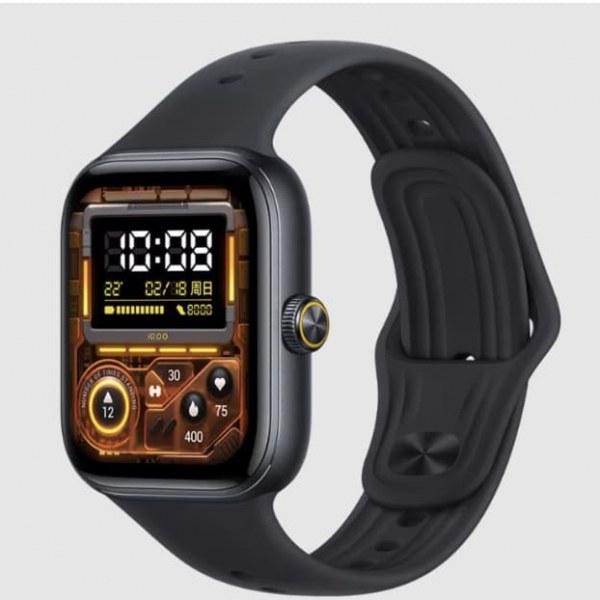
iqoo Watch GT 2
Offers
-
 iqoo Watch GT 2
View Offer
iqoo Watch GT 2 Specifications
| BASIC INFO | |
| Brand | Vivo |
| Model | iQOO Watch GT 2 |
| Status | Coming Soon |
| Release date | 2025, October |
| BODY | |
| Dimensions | 46.7 x 46.7 x 11.4 mm (1.84 x 1.84 x 0.45 in) |
| Weight | 52 g (1.83 oz) |
| Colors | Night Black, Nebula Gray |
| Body Material | Glass front (Sapphire crystal), ceramic back, titanium frame |
| SIMs | No |
| Water/Dust | 50m water resistant Compatible with standard 22mm straps |
| DISPLAY | |
| Size | 1.39 inches |
| Type | AMOLED |
| Resolutions | 454 x 454 pixels |
| PPI | 326 ppi density |
| Multi touch | Yes |
| Protection | – |
| NETWORKS | |
| 2G | N/A |
| 3G | N/A |
| 4G | N/A |
| 5G | No |
| Speed | No |
| CAMERA | |
| Rear | No |
| Front | No |
| HARDWARE | |
| YOU | Lite OS |
| Chipset | Kirin A1 |
| CPU | No |
| RAM | 32MB |
| Internal | 4GB |
| Card Slot | No |
| BATTERY | |
| Type | Li-lon |
| Capacity | 455 mAh |
| Removable | Non-Removable |
| Fast Charging | Wireless charging |
| Wireless Charging | Yes |
| COMMONS | |
| Sound | Loudspeaker No 3.5mm Jack No |
| Sensors | Accelerometer, gyro, heart rate, barometer, compass, SpO2, VO2max |
| Bluetooth | 5.1, LE, EDR |
| GPS | Yes, with GLONASS, GALILEO |
| USB | No |
| Wi-Fi | No |
Reviews
Sorry, you have not permission to write review for this product.
Disclaimer Note
You can write your own disclaimer from APS Settings -> General -> Disclaimer Note.

New Arrivals



ADVERTISE