
|

|
Trending
- REDMI Book 14 2027 Teased With 20.2-Hour Battery Life and Super XiaoAI 2.0
- Zombies Cat B23 Review: Open-Ear Clip-On Earbuds With Bluetooth 6.0 and 30-Hour Battery Life
- QS51 Smartwatch Review: 1.47-Inch Display, Bluetooth Calling and Everyday Health Tracking
- Freeboy H14 Electric Scooter Review: 750W Motor, 48V 18Ah Battery and 14-Inch Tires
- HX808 RC Flying Butterfly Review: Flapping Wings, LED Lights, and a Unique Flying Experience
- Walmart Foot Massager Deal: Save 40% and Pay Just $48.69
- HQD SLYD 60K Review: Modular Design, Dual Battery System and Key Features
- Kangvape Hoka E-Hookah 150K: Features, Design and Key Buying Considerations

 |
 |
 |
 |
 |
 |
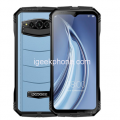
Doogee V
-
Processor
MediaTek P40 Octa-Core -
RAM
6GB -
Storage
128GB -
Display
6.2 inches AMOLED FHD+ Display (1080 x 2160 Pixels) -
Camera
21MP + 21MP Dual Rear Camera, 16MP + 16MP Dual Front -
Operating System
Android 8.0 Oreo
Offers
-
Doogee V
View Offer -
 Doogee V
View Offer -
Doogee V
View Offer -
Doogee V
View Offer -
Doogee V
View Offer -
 Doogee V
View Offer
Specs
General
| Device Type | Smartphone |
| Model | Doogee V |
Hardware
| CPU | MediaTek P40 Octa-Core |
| RAM | 6GB |
| ROM | 128GB |
Display
| Screen type | AMOLED FHD+ Display |
| Screen size | 6.2 inches |
| Screen resolution | 1080 x 2160 Pixels |
Camera
| Camera type | Four camera |
| Back camera | 21MP + 21MP Dual Rear Camera |
| Front camera | 16MP + 16MP Dual Front |
Network
| 2G | 850/900/1800/1900MHz |
| 3G | 850/900/2100MHz |
| 4G | 800/900/1800/2100/2600MHz |
| SIM | Nano SIM Card |
| Dual SIM | Dual SIM Card, dual standby |
OS
| Operating System | Android 8.0 |
Other Features
| I/O Interface | 3.5mm Audio Out Port,Speaker |
| Bluetooth Version | 4.0 |
| Sensor | Ambient Light Sensor,Gravity Sensor,Proximity Sensor |
| Features | 3G,4G,Alarm,Bluetooth,Browser,Calculator,Calendar,Camera,Fingerprint recognition, |
Battery
| Battery Capacity (mAh) | 4,200 mAh |
| Battery Type | Li-Ion (Lithium Ion) |
Dimensions and Weight
Reviews
Sorry, you have not permission to write review for this product.
Disclaimer Note
You can write your own disclaimer from APS Settings -> General -> Disclaimer Note.
More Products from Doogee
New Arrivals

ADVERTISE



