
|

|
Trending
- OneOdio Studio Max 2 Review – DJ Freedom Without the Wireless Compromise
- MAXRAY RUSH 80K Review – More Than Just a Puff Count: Meet the Disposable That Controls Its Own E-Liquid
- Vidda C5 Pro Review: A 4K Projector for Home Cinema and Gaming
- iBUYPOWER AI Halo Mini PC Debuts With Ryzen AI Max+ PRO 495
- Honor WIN 2 Gaming Phones and Tablet Expected to Debut in October
- UK Cryptocurrency Adoption Grows as More Britons Invest in Digital Assets
- Redmi Phone Storage Full? How to Safely Remove Junk Files
- C48Pro Smartwatch: What Can You Do on a 2.01-Inch Screen?

 |
 |
 |
 |
 |
 |
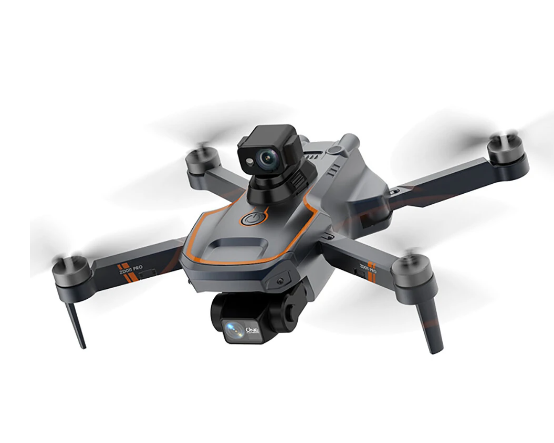
ZD011 PRO GPS 5G WiFi RC Drone
-
Processor
-
RAM
-
Storage
-
Display
-
Camera
-
Operating System
Offers
-
 ZD011 PRO GPS 5G WiFi RC Drone
View Offer
Specifications:
Item NO.: ZD011 PRO
Material: Plastic, Metal, Electronic Components
Color: Black&Grey
Frequency: 2.4G Channel: 4CH
Gyro: 6-Axis
Motor: 1503 2500KV Brushless Motor
ESC: 25A
Quadcopter Battery: 7.4V 1500mAh Lipo (Included)
Flying Time: About 21mins
Charging Time: About 360mins
Transmitter Mode: Mode 2 (Left Hand Throttle)
Remote Control Battery: Built-in 3.7V 500mAh Lipo Battery
Remote Control Charging Time: About 210mins
Remote Control Using Time: About 210mins
R/C Distance: About 300m (No Interference, No Obstruction)
FPV: 5G WiFi
FPV Distance: About 300m (No Interference, No Obstruction)
Camera: 4K HD
Camera Adjustable Angle: Adjustable camera by transmitter, 110°
Video Resolution: 1920*1080P(APP)
Photo Resolution: 3820*2160P
Frame Rate: 25-30 fps
Video Format: MP4 or AVI
Photo Format: JPG
Mobile Device System Version: iOS 8.0 or later / Android 4.4.4 or later
Positioning System: GPS + Optical Flow Positioning
Obstacle Avoidance System: Laser Obstacle Avoidance
Take-Off Weight: 236g (without Obstacle Avoider)
Quad’s Size: 140 x 140 x 58mm(Folded), 350 x 350 x 85mm(Unfolded)
Package Size: 27 x 20 x 8cm
Package Weight: About 600g
Reviews
Sorry, you have not permission to write review for this product.
Disclaimer Note
You can write your own disclaimer from APS Settings -> General -> Disclaimer Note.
More Products from Nubia
New Arrivals






ADVERTISE



