
|

|
Trending
- HPI Stage-D10 Review: A Mustang RC Drift Car Built for Skill and Customization
- HOVERAir VERSA Review: A Pocket Gimbal Camera That Can Take Flight
- DaranEner NEOZ2 Review: Is This 300W Portable Power Station Worth Buying?
- PowerAlgo Expands Global Cloud Mining Services With a Focus on Bitcoin Mining and Renewable Energy
- OneOdio Studio Max 2 Review – DJ Freedom Without the Wireless Compromise
- MAXRAY RUSH 80K Review – More Than Just a Puff Count: Meet the Disposable That Controls Its Own E-Liquid
- Vidda C5 Pro Review: A 4K Projector for Home Cinema and Gaming
- iBUYPOWER AI Halo Mini PC Debuts With Ryzen AI Max+ PRO 495

 |
 |
 |
 |
 |
 |
- Shop
- Accessories
- Xiaomi Mini PC Intel Core i5 16GB DDR4 512GB SSD
Xiaomi Mini PC Intel Core i5 16GB DDR4 512GB SSD
Offers
-
 Xiaomi Mini PC Intel Core i5 16GB DDR4 512GB SSD
$ 876.99
Xiaomi Mini PC Intel Core i5 16GB DDR4 512GB SSD
$ 876.99
View Offer
Highlights
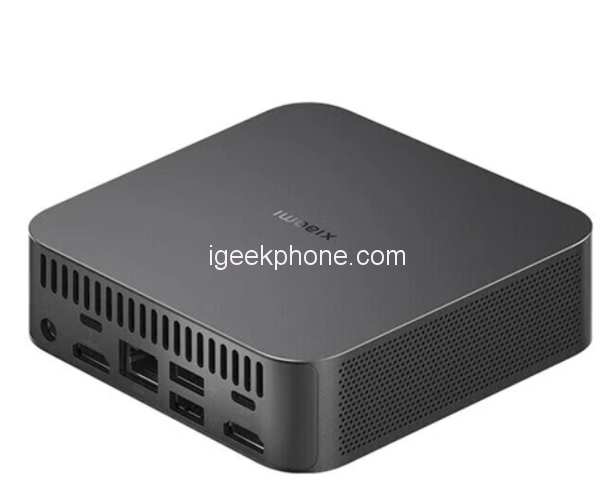
Xiaomi’s latest computers are powered by a 12th-generation Core i5 processor and have a 12-core, 16-thread heterogeneous design. The processor in Xiaomi’s Mini PC tops out at 4.4GHz.
Intel Iris Xe graphics card (80 UE) and ports for external graphics cards and hard drives.
A Xiaomi mini computer pre-installed with Windows 11. Users can also choose to migrate to Ubuntu, OpenWRT, UNRAID, and EXSI operating systems.
Both variants include 16GB of DDR4 RAM, while the standard variant includes 512GB of PCIe 4.0 SSD storage. This can optionally be expanded to 32GB of RAM and 4TB SSD storage.
In terms of heat dissipation, the Mi Mini PC comes with a 4,600 RPM fan and dual heat pipe cooling system
In terms of design, the Mi Minicomputer has a rectangular aluminum body.
For connectivity, the PC offers Bluetooth 5.3 and Wi-Fi 802.11ax support. The device also includes a 3.5mm headphone jack, three USB 3.4 Type-A Gen 2 ports, one USB Type-A 2.0 port, two Thunderbolt 4 ports, two HDMI 2.1 ports, and an Ethernet port. In addition, it measures 112 x 112 x 38mm and weighs 437g.
Reviews
Sorry, you have not permission to write review for this product.
Disclaimer Note
You can write your own disclaimer from APS Settings -> General -> Disclaimer Note.

New Arrivals






ADVERTISE



