
|

|
Trending
- Vaporesso PRIX Kit vs XROS 6 Review: Battery Life, Pod Design and Everyday Differences
- Blackview XPLORE 6 Leaks Reveal Key Specs of a Rugged Flagship Phone
- Exploring Risk Management through Futures: Delving into Hedging and Speculation
- The Psychology of Gambling: Understanding the Mindset behind Risk-taking and Addiction
- How to Enable the System Performance Monitor Window on Xiaomi Phones?
- How to Identify a Counterfeit PAX Vaporizer Before Buying?
- Dinner Lady LYXA 30K Review: Battery, Dual Mesh Coil and Key Specifications
- A Comprehensive Examination of the GameZone App Ecosystem of Competition and Community

 |
 |
 |
 |
 |
 |
- Shop
- Accessories
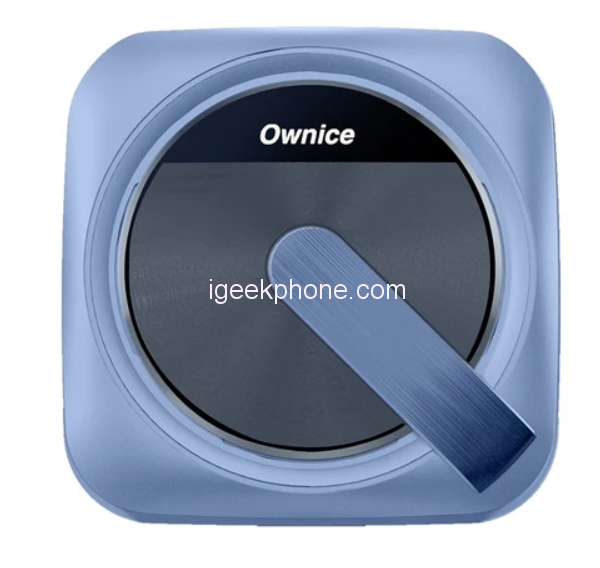
- Ownice T3 Wireless Auto Ai Box
Ownice T3 Wireless Auto Ai Box
Offers
-
 Ownice T3 Wireless Auto Ai Box
$ 104.99
Ownice T3 Wireless Auto Ai Box
$ 104.99
View Offer
Highlights
Special for Tesla Cars
T-Box is designed for Tesla to Ai-Link your iPhone or Android Phone to use Wireless CarPlay and AirPlay or Wireless Android Auto and MiraCast on Tesla’s Web Browser, giving you a better driving experience.
Easy to Use
Just plug into the original USB port, and it establishes the Wireless Link between the phone and the Tesla display.
Dual WiFi
One with 2.4G+5G for establishing Ai-link between mobile phones and Tesla.; one with 2.4G for access Internet via HotSpot from Other WiFi Devices (When using T-box, it cut off the Tesla’s 4G Network so we add another WiFi for internet access).
Navigation
It supports the use of mobile phones’ Online Map APPs, such as Waze, Google Maps, Apple map, etc.
Touch Control
This Ai Box keeps all functions of the original head unit including the original control ways, such as steering wheel control, and touch screen control.
Voice Control
Support using Siri or Google Voice control to send voice commands for making calls, playing music, etc.
More Functions
Ownice T-Box also supports OTA updates, changing wallpaper, split screen, hands-free calls, and downloading more supported Apps.
Reviews
Sorry, you have not permission to write review for this product.
Disclaimer Note
You can write your own disclaimer from APS Settings -> General -> Disclaimer Note.

New Arrivals





ADVERTISE



