
|

|
Trending
- Vaporesso PRIX Kit vs XROS 6 Review: Battery Life, Pod Design and Everyday Differences
- Blackview XPLORE 6 Leaks Reveal Key Specs of a Rugged Flagship Phone
- Exploring Risk Management through Futures: Delving into Hedging and Speculation
- The Psychology of Gambling: Understanding the Mindset behind Risk-taking and Addiction
- How to Enable the System Performance Monitor Window on Xiaomi Phones?
- How to Identify a Counterfeit PAX Vaporizer Before Buying?
- Dinner Lady LYXA 30K Review: Battery, Dual Mesh Coil and Key Specifications
- A Comprehensive Examination of the GameZone App Ecosystem of Competition and Community

 |
 |
 |
 |
 |
 |
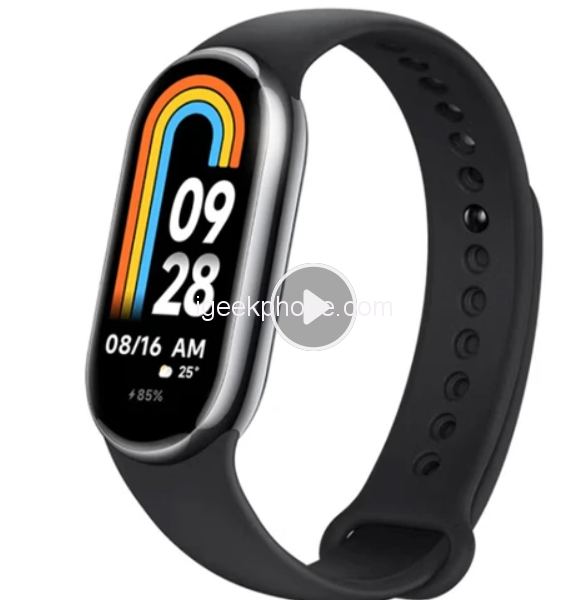
Xiaomi Mi Band 8
Offers
-
 Xiaomi Mi Band 8
$ 54.99
Xiaomi Mi Band 8
$ 54.99
View Offer
Specification
| General | Brand: Xiaomi Model: Mi Band 8 Color: Black |
| Hardware Specification | Bluetooth Version: BLE5.1 Water resistance: 5ATM System Requirement: Android 6.0 and above, iOS 12.0 and above Sensor: Optical Heart Rate and Blood Oxygen Sensor, 6-axis Motion Sensor |
| Functions | Health Tracker: Heart Rate Monitor, Blood Oxygen, Sleep Monitor, Pressure Monitor, Respiratory Training, Women’s Health Management Other Functions: Stop Watch, Alarm Clock, Timer, Find My Phone, Phone Unlocking, Event Reminder, Do Not Disturb Mode, Lock Screen, Music Control Strip, Remote Control of Camera |
| Screen | Screen: AMOLED Screen Size: 1.62 inch Resolution: 192*490 Operating Mode: Touch Screen |
| Battery | Battery Capacity: 190mAh Charging Time: about 1 hour Standby Time: 16 days Use Time: 6 days |
| Material | Strap Length: 135-210mm Available Colors: Black, Light Gold Band Material: TPU |
| APP/Language | APP/APK: Xiaomi Sports Health Smartband Support Language: Simplified Chinses, Traditional Chinese, English |
| Weight & Size | Product Weight: 27g |
| Package Contents | 1 x Smartwatch 1 x Charging Cable 1 x User Manual |
Reviews
Sorry, you have not permission to write review for this product.
Disclaimer Note
You can write your own disclaimer from APS Settings -> General -> Disclaimer Note.
New Arrivals




ADVERTISE



