
|

|
Trending
- How to Identify a Counterfeit PAX Vaporizer Before Buying?
- Dinner Lady LYXA 30K Review: Battery, Dual Mesh Coil and Key Specifications
- Bubblemon Graffiti 3 Kit Review: Adjustable Power, LED Effects and a 1500mAh Battery
- Philippines Introduces Mandatory Safety Certification for Nicotine Pouches, Sets 12-Month Transition Period
- UK Vape Regulations From October 29: New Age Limits, Sales and Promotion Rules Explained
- Elfeland Galaxy Projector Review: 24 Light Patterns and White Noise in One Compact Night Light
- HPI Stage-D10 Review: A Mustang RC Drift Car Built for Skill and Customization
- HOVERAir VERSA Review: A Pocket Gimbal Camera That Can Take Flight

 |
 |
 |
 |
 |
 |
- Shop
- Accessories
- Bakeey S01 Smart Watch
Bakeey S01 Smart Watch
Offers
-
 Bakeey S01 Smart Watch
$25.94
Bakeey S01 Smart Watch
$25.94
View Offer
-
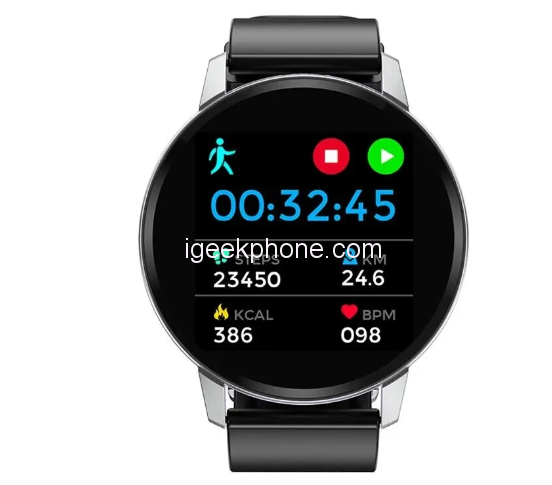
Specification Brand Bakeey Model S01 Bluetooth Version BT 4.0 or above Compatible OS Android 4.4 or above,iOS 7.0 or above Operating Mode Full Touch APP Name Da Fit App Language Chinese, English, Korean, German, Spanish, Japanese, French, Italian, Russian, Portuguese, Arabic Band Language
Chinese, English, Korean, German, Spanish, Japanese, French, Italian, Russian, Portuguese, Arabic Special Features Waterproof IP67 Heart Rate Monitor Support Blood Pressure Monitor Support Blood Oxygen Monitor Support Step Count Support Multi-sport Modes Support Pedometer Support Call or Message Reminder Support Reject Call / Call ID Display
Support Alert Type Vibration Auto Light-up Screen Support Stopwatch Support More Functions Support Alarm,Calender,Sedentary reminder,Camera remote control,Anti-lost,Weather display Technical Parameters Sensor G-sensor,Heart Rate Sensor Screen Size: 1.22inch
Type: IPS
Resolution: 240*240pixelsBattery Battery Capacity: 150 mAh
Standby Time: About 10 days
Using time: About 7 days
Charging Time: About 2 hours
Charging Type: Dock chargingAppearance & Details Weight and Size Dial Size: About 41mm
Band Size: about 41*10*220mm
Product Weight: about 55g1*Bakeey S01 Smart Bracelet 1*Charging Cable 1*User Manual
Reviews
Sorry, you have not permission to write review for this product.
Disclaimer Note
You can write your own disclaimer from APS Settings -> General -> Disclaimer Note.
New Arrivals




ADVERTISE



