
|

|
Trending
- OneOdio Studio Max 2 Review – DJ Freedom Without the Wireless Compromise
- MAXRAY RUSH 80K Review – More Than Just a Puff Count: Meet the Disposable That Controls Its Own E-Liquid
- Vidda C5 Pro Review: A 4K Projector for Home Cinema and Gaming
- iBUYPOWER AI Halo Mini PC Debuts With Ryzen AI Max+ PRO 495
- Honor WIN 2 Gaming Phones and Tablet Expected to Debut in October
- UK Cryptocurrency Adoption Grows as More Britons Invest in Digital Assets
- Redmi Phone Storage Full? How to Safely Remove Junk Files
- C48Pro Smartwatch: What Can You Do on a 2.01-Inch Screen?

 |
 |
 |
 |
 |
 |
FLY WING FW200 RC Helicopter
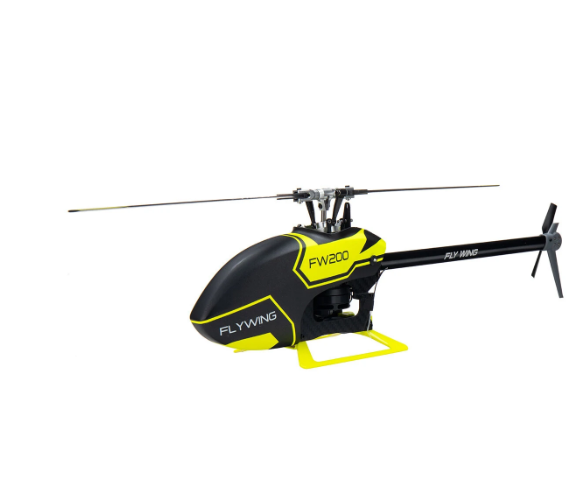
Offers
-
 FLY WING FW200 RC Helicopter
$409
FLY WING FW200 RC Helicopter
$409
View Offer
Description:
Brand: FLYWING
Item: FW200
Product: RC Helicopter
Frequency: 2.4G
Channel: 4CH
Length(No blade): 440mm
Main blade: 200mm
Width: 88mm
Tail diameter: 74mm
Height:130mm
Main blade diameter: 455mm
Weight(No battery): 287g
Flight controller: H1-V2
Hovering level: ±1.5吗(GPS is normal)
Hovering vertical: ±0.5m(GPS is normal)
Hovering Module: GPS/GLONASS TOF sensor
Features:
1.Stable mode,the helicopter flies stably which is suitable for the beginner.
2.Smart acrobatics,in stable mode,we have sophisticated programs to assist beginners in some simple acrobatics flights and reduce the number of helicopter crashing.
3.Full manual,The helicopter has strong power and is fully competernt for manual violent flight.It is suitable for all kinds of competitive performances and flight displays.
4.Transmitter can be changed to mode 1 /mode 2 freely.The factory default setting of the remote control is mode 2
Notice:
The material of the landing skid changed from carbon fiber to plastic,and the color follows the color of the helicopter
User Manual: Click Here
FW200 Android APP:Click Here
If you have any technical questions, you can first check the following link video on YouTube
Package Included:
1x FW200 RC Helicopter
1x FW200 Remote Control
1x ACE TATTU 3S 11.1V 850mAh 45C Battery
1x B3 Charger
Reviews
Sorry, you have not permission to write review for this product.
Disclaimer Note
You can write your own disclaimer from APS Settings -> General -> Disclaimer Note.
New Arrivals





ADVERTISE



