
|

|
Trending
- VAPORESSO VAST Kit Review: One Pod, Three Resistances and a 1600mAh Battery
- EVOL 100K Review: What to Know About Its 100,000-Puff Design
- DOJO BLAST X Kit Review: Understanding Its 10ml Pod System and Dual-Mesh Design
- CrossBar 20K Draws Attention in Pennsylvania’s Vape Directory as PMTA Questions Remain
- What is responsible gaming you need?
- Mureka: An Innovative Song Maker Empowering Music Creators Everywhere
- Safeguard Your Operations: The Crucial Role of Hyper-V VM Backup
- What are some methods to increase the volume of headphones?

 |
 |
 |
 |
 |
 |
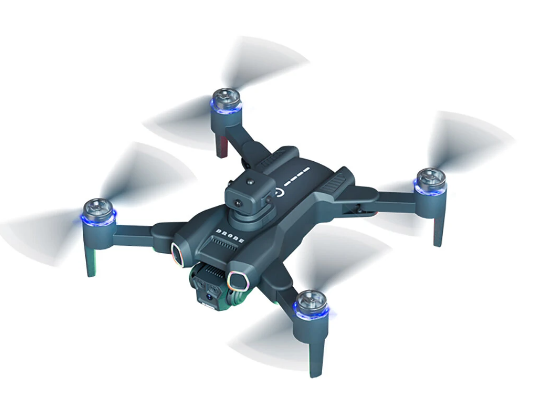
JJRC H117 RC Drone
Offers
-
 JJRC H117 RC Drone
$34.99
JJRC H117 RC Drone
$34.99
View Offer
Specifications:
Brand Name: JJRC
Item NO.: H117
Item Name: Sunsdow
Material: Plastic, Metal, Electronic Components
Color: Black
Frequency: 2.4G Channel: 4CH
Gyro: 6-Axis
Motor: Brushless
Quadcopter Battery: 3.7V 1800mAh Lipo (Included)
Flying Time: About 12 mins
Charging Time: About 120 mins
Transmitter Mode: Mode 2 (Left Hand Throttle)
Remote Control Battery: 3 x AA Battery (NOT Included)
R/C Distance: About 100m
FPV: 2.4G WiFi
FPV Distance: About 50m
Camera: 480P
Camera Adjustable Angle: 90° by Remote Control
Positioning System: Optical Flow Positioning
Quad’s Size: 150 x 120 x 60mm(Folded), 280 x 300 x 60mm(Unfolded)
Take-off Weight: 171g
Package Size: 21.7 x 8.5 x 17.2cm
Package Weight: 478g
Features:
– With foldable arm, small size, easy to carry.
– With Obstacle Avoidance, real-time 360° rotation detection of obstacle avoidance head. Omnidirectional and sensitive perception.
– With ESC HD camera, support 90° remote control of lens angle to make the shooting wider.
– With wifi function can be connected APP, APK system to take pictures/video, real-time transmission through the phone camera image
– Optical flow fixed point hover provides stable flight.
– Surround action will enable the aircraft flying in a circle, providing cooler shooting perspective.
– With Headless Mode,no need to adjust the position of aircraft before flying .
– Waypoint flight mode, just draw a route on the screen, the copter as the give path. – With 3.7V 1800mAh battery, the fly time up to 12 mins.
– With One key to return function makes it easily to find the way home.
– Feel the brushless motor the power. Strong wind resistance,support sea flight.
– One Key Takeoff /Landing. One press automatically taking off or landing, the drone will take off or go back to the position where it took off.
– 5GHz Technology Adopted for Anti-Interference. – 4 Channel which can do ascend, descend, forward, backward, left sideward fly, right sideward fly.
– The quadcopter fuselage is made of high strength and resistant engineering plastics,lightweight and durable resistance.
– 6-axis g-yro which can have more stable flying and be easy to control. – It have 3-level flight speed to switch that can make more fun with the flying.
Function: Up/down, Forward/backward, Turn left/right, Sideward flight, 3-level flight speed, LED Light, Headless Mode, One Key Return, One Key Takeoff /Landing, Brushless, WiFi FPV, Dual Camera/Video, Optical Flow Positioning, Surrounding Flight, Waypoint Flight, Obstacle Avoidance
Package Included:
1 x JJRC H117 Quadcopter 1 x Remote Control 1 x 3.7V Battery 1 x USB Charging Cable 2 x Spare Propeller 1 x Screwdriver 1 x Manual 1 x Storage Bag
Reviews
Sorry, you have not permission to write review for this product.
Disclaimer Note
You can write your own disclaimer from APS Settings -> General -> Disclaimer Note.
New Arrivals

ADVERTISE



