
|

|
Trending
- HPI Stage-D10 Review: A Mustang RC Drift Car Built for Skill and Customization
- HOVERAir VERSA Review: A Pocket Gimbal Camera That Can Take Flight
- DaranEner NEOZ2 Review: Is This 300W Portable Power Station Worth Buying?
- PowerAlgo Expands Global Cloud Mining Services With a Focus on Bitcoin Mining and Renewable Energy
- OneOdio Studio Max 2 Review – DJ Freedom Without the Wireless Compromise
- MAXRAY RUSH 80K Review – More Than Just a Puff Count: Meet the Disposable That Controls Its Own E-Liquid
- Vidda C5 Pro Review: A 4K Projector for Home Cinema and Gaming
- iBUYPOWER AI Halo Mini PC Debuts With Ryzen AI Max+ PRO 495

 |
 |
 |
 |
 |
 |
- Shop
- Accessories
- RC Drone
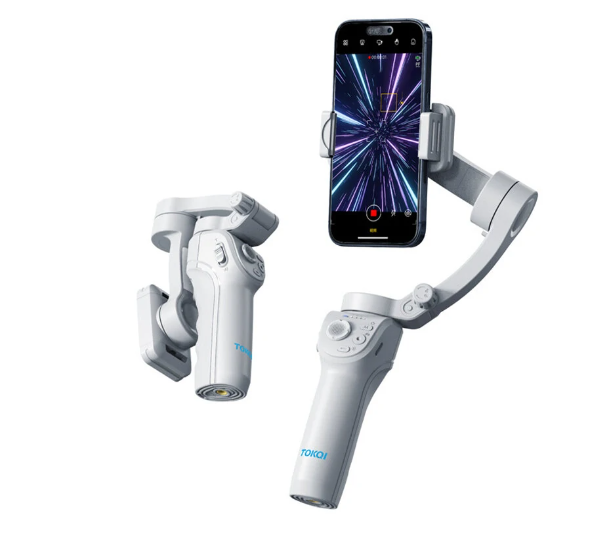
- TOKQI M01 3-Axis Gimbal Stabilizer
TOKQI M01 3-Axis Gimbal Stabilizer
Offers
-
 TOKQI M01 3-Axis Gimbal Stabilizer
$56.99
TOKQI M01 3-Axis Gimbal Stabilizer
$56.99
View Offer
Specification:
Brand: TOKQI
Model: M01
Size: 163x119x50mm (Folded), Tripod – 32.5×32.5x95mm (Folded)
Weight: Gimbal Weight: 378g, Tripod Weight: 40g
Battery Capacity: 3600mAh
Material: PA66
Structural Rotation Range: Roll – 330°, Pitch – 330° Bearing – 320°
Control Rotation Angle: Roll – 320°, Pitch – 65° Bearing – 300°
Fit for Smartphone Width: 55-90mm, Thickness: ≤11mm, Weight: ≤280g
Charging Current: 2A (Max), Working Current: 500mA (Approximately)
Working Duration: 8 hours
Features:
1. 3-Axis Gimbal Stabilizer: Helps to take stable and high-quality photos or videos without blurring.
2. Intelligent Face Tracking: Able to automatically track and focus on your face during live streaming or vlogging.
3. Durable Material: Made of PA66, the gimbal and tripod are highly durable and can withstand long-term usages.
4. Strong Compatibility: Can hold smartphones with a width between 55 to 90mm, a thickness of less than 11mm, and a weight of less than 280g.
5. Filling Light & Foldable Tripod: Comes with a light to provide you with perfect lighting for your pictures and videos, also comes with a foldable tripod for flexible usages.
Package Includes:
1x TOKQI M01 3-Axis Gimbal Stabilizer
1x Foldable Tripod
1x Charging Cable
1x User Manual
1x Package Box
Reviews
Sorry, you have not permission to write review for this product.
Disclaimer Note
You can write your own disclaimer from APS Settings -> General -> Disclaimer Note.
More Products from Xiaomi
New Arrivals





ADVERTISE



