
|

|
Trending
- Nothing Headphone (1) Pro Launches with Triple Drivers, 46dB ANC and 68-Hour Battery Life
- Garmin MARQ Gen 3 Surfaces on Official Support Pages, Hinting at a New Premium Sports Watch
- Honor WIN Tablet Opens for Reservations with a 240Hz OLED Display and Snapdragon 8 Elite Gen 5
- OnePlus 16 Debuts with Snapdragon 8 Elite Extreme Gen 6 and 185FPS Gaming
- Unboxing the OXVA XLIM 4: Pocket Luxury, Serious Stamina
- OXVA XLIM 4 First Look: Pure Pocket Luxury
- What Does 58,000 Puffs Actually Mean? Understanding Vape Puff-Count Claims
- JNR Falcon Crest 58K Review: A Perfume-Inspired Refillable Vape with a Transparent Tank

 |
 |
 |
 |
 |
 |
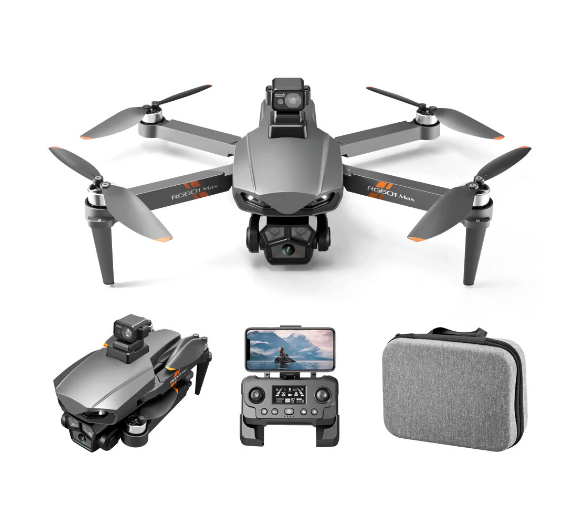
PJC RG601 MAX RC Drone
Offers
-
 PJC RG601 MAX RC Drone
$99.99
PJC RG601 MAX RC Drone
$99.99
View Offer
Specifications:
Brand Name: PJC
Item NO.: RG601 MAX
Material: Plastic, Metal, Electronic Components
Color: Black
Frequency: 2.4G Channel: 4CH
Gyro: 6-Axis
Motor: 1503 Brushless
Quadcopter Battery: 7.4V 3000mAh Lipo (Included)
Flying Time: About 20mins
Charging Time: About 120 mins
Remote Control Mode: Mode 2 (Left Hand Throttle)
Remote Control Battery: Built-in 3.7V 500mAh Lipo Battery
R/C Distance: About 600m
FPV: 5G WiFi
FPV Distance: About 300m
Camera: 1080P HD Dual Wide-angle
Camera Adjustable Angle: 90° by Remote Control
Positioning System: GPS + Optical Flow Positioning
Quad’s Size: 175 x 100 x 85mm(Folded), 350 x 310 x 85 mm(Unfolded)
Take-off Weight: 326g (Battery 91g, Avoider 16g)
Package Size: 30 x 10.5x 23.5cm
Package Weight: 926g
Features:
– With foldable arm, small size, easy to carry.
– With Obstacle Avoidance, real-time 360° rotation detection of obstacle avoidance head. Omnidirectional and sensitive perception.
– With 1080P HD camera and servo gimbal, support 90° remote control of lens angle to make the shooting wider.
– GPS positioning mode provides a more accurate flight.
– With 5G wifi function can be connected APP, APK system to take pictures/video, real-time transmission through the phone camera image
– Optical flow fixed point hover provides stable flight.
– Remote control distance up to 600m.
– Follow me: the aircraft will fix the controlling cellphone and follow the operator whichever direction he moves.
– Surround action will enable the aircraft flying in a circle, providing cooler shooting perspective.
– With Headless Mode,no need to adjust the position of aircraft before flying .
– Waypoint flight mode, just draw a route on the screen, the copter as the give path. – With 7.4V 3000mAh battery, the fly time up to 20 mins.
– With One key to return function makes it easily to find the way home.
– Feel the brushless motor the power. Strong wind resistance,support sea flight.
– One Key Takeoff /Landing. One press automatically taking off or landing, the drone will take off or go back to the position where it took off.
– 5GHz Technology Adopted for Anti-Interference. – 4 Channel which can do ascend, descend, forward, backward, left sideward fly, right sideward fly.
– The quadcopter fuselage is made of high strength and resistant engineering plastics,lightweight and resistance.
– 6-axis g-yro which can have more stable flying and be easy to control. – It have 3-level flight speed to switch that can make more fun with the flying.
Function: Up/down, Forward/backward, Turn left/right, Sideward flight, 3-level flight speed, LED Light, Headless Mode, One Key Return, One Key Takeoff /Landing, Brushless, WiFi FPV, Dual Camera/Video, Optical Flow Positioning, GPS Positioning, Follow Me, Surrounding Flight, Waypoint Flight, Obstacle Avoidance
Package Included:
1 x RG601 MAX Quadcopter
1 x Remote Control
1 x Obstacle avoider (Optional)
1 x 7.4V Battery
1 x USB Charging Cable
2 x Spare Propeller
1 x Screwdriver 1 x Manual
1 x Storage Bag
Reviews
Sorry, you have not permission to write review for this product.
Disclaimer Note
You can write your own disclaimer from APS Settings -> General -> Disclaimer Note.
New Arrivals




ADVERTISE



