
|

|
Trending
- DaranEner NEOZ2 Review: Is This 300W Portable Power Station Worth Buying?
- PowerAlgo Expands Global Cloud Mining Services With a Focus on Bitcoin Mining and Renewable Energy
- OneOdio Studio Max 2 Review – DJ Freedom Without the Wireless Compromise
- MAXRAY RUSH 80K Review – More Than Just a Puff Count: Meet the Disposable That Controls Its Own E-Liquid
- Vidda C5 Pro Review: A 4K Projector for Home Cinema and Gaming
- iBUYPOWER AI Halo Mini PC Debuts With Ryzen AI Max+ PRO 495
- Honor WIN 2 Gaming Phones and Tablet Expected to Debut in October
- UK Cryptocurrency Adoption Grows as More Britons Invest in Digital Assets

 |
 |
 |
 |
 |
 |
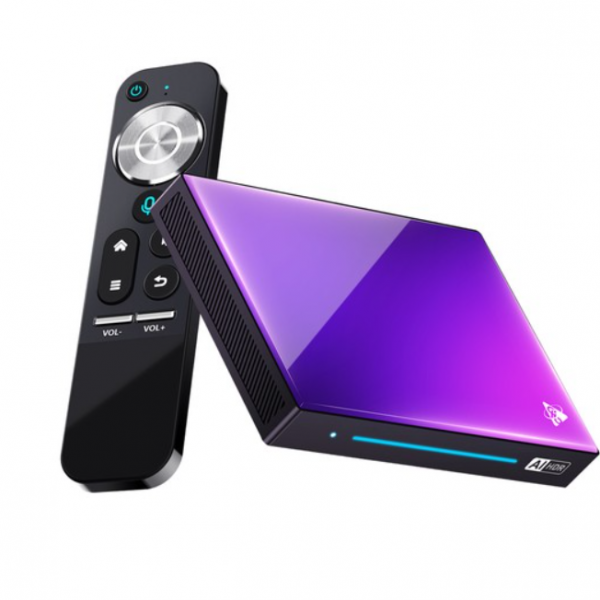
H96 Max M9 8GB+128GB Android 14 TV Box
Offers
-
 H96 Max M9 TV Box
$ 107.12
H96 Max M9 TV Box
$ 107.12
View Offer
Highlights
Powerful Hardware
The H96 Max M9 Smart TV Box features a robust RK3576 chipset, providing excellent performance and efficient processing power for a seamless user experience. With this powerful hardware, you can enjoy smooth multitasking, quick app launches, and responsive navigation.
Android 14.0 OS
This TV box runs on the latest Android 14.0 operating system, which brings numerous enhancements and new features to the user interface. With Android 14.0, you can expect improved performance, enhanced privacy settings, advanced security features, and a more intuitive interface.
8K Decoding
The H96 Max M9 RK3576 Smart TV Box supports both 8K decoding, allowing you to enjoy stunning visuals with exceptional clarity and depth. Whether you’re streaming your favorite movies, playing immersive games, or browsing high-resolution images, this TV box ensures an immersive viewing experience with lifelike details.
WiFi 6 Connectivity
With WiFi 6 support, the H96 Max M9 RK3576 Smart TV Box offers faster and more reliable wireless connectivity. WIFI6 provides higher data transfer speeds, reduced latency, and improved network efficiency, allowing you to stream content seamlessly, download files quickly, and enjoy online gaming without interruptions.
Reviews
Sorry, you have not permission to write review for this product.
Disclaimer Note
You can write your own disclaimer from APS Settings -> General -> Disclaimer Note.


New Arrivals





ADVERTISE



