
|

|
Trending
- HPI Stage-D10 Review: A Mustang RC Drift Car Built for Skill and Customization
- HOVERAir VERSA Review: A Pocket Gimbal Camera That Can Take Flight
- DaranEner NEOZ2 Review: Is This 300W Portable Power Station Worth Buying?
- PowerAlgo Expands Global Cloud Mining Services With a Focus on Bitcoin Mining and Renewable Energy
- OneOdio Studio Max 2 Review – DJ Freedom Without the Wireless Compromise
- MAXRAY RUSH 80K Review – More Than Just a Puff Count: Meet the Disposable That Controls Its Own E-Liquid
- Vidda C5 Pro Review: A 4K Projector for Home Cinema and Gaming
- iBUYPOWER AI Halo Mini PC Debuts With Ryzen AI Max+ PRO 495

 |
 |
 |
 |
 |
 |
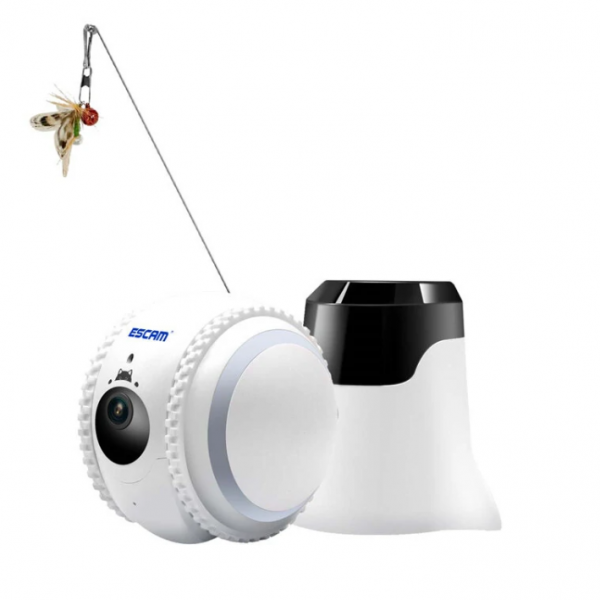
ESCAM QF011 2MP 1080P Smart Pet Robot Camera
Offers
-
 ESCAM QF011 2MP 1080P Smart Pet Robot Camera
$114.99
ESCAM QF011 2MP 1080P Smart Pet Robot Camera
$114.99
View Offer
Parameters:
Brand: ESCAM
Model: QF011
DSP: High performance AI vision chip
System: Embedded Linux system
DDR: 128 MB
Flash: 64 MB
Camera: 2 MP 1080P Full HD
Night Vision: IR LED x 2
Loudspeaker: 8Ω / 1W
Microphone: -33±3dB
Network Connection: 2.4G WiFi6(IEEE 802.11b/g/n)
Network Distribution: bluetooth, QR Code Scan, AP hotpot
Pets Recognition: Support
Avoiding Obstacles: Support
Laser Spot: Support
Charging Station: Support (within 2.5 meter open place range)
Light strip: Support
Max Speed: 35cm/s
Memory card: Built in 32GB memory card
Climbing Angle & Obstacle Crossing Height: 2 degree,3mm
Battery capacity: 800mAh /8.4V
Continuous Working: 2 hours
Standby Time: 3.5 hours
Battery Full Charge Time: 1.5 hours
Power: DC 12V/1A
Working Temperature: -10 ~55 ℃ ℃
Dimension: 95.91*97.14* 94.24 mm
Packing weight: 0.9kg
Packing size: 255*140*115mm
Features:
1. 2MP Resolution 1920*1080
2. Night version,2pcs IR led,IR distance is up to 3m
3. One-click automatic recharge,800mAh battery, stay by time 3.5hrs
4. Multiple Cambinations of various teasing, movement, voice, lighting
5. Support bluetooth, WiFi conection, remote view your pets
6. High quality two way audio,with noise cancellation
7. Tumbler Design & Dog/cat recognition, tracking recording
8. Built-in 32G memory card
Package Include:
1x IP Camera
1x Charging Station
1x Power Adapter(EU)
1x Cat Teaser Stick
1x Quick Start Quide
Reviews
Sorry, you have not permission to write review for this product.
Disclaimer Note
You can write your own disclaimer from APS Settings -> General -> Disclaimer Note.
New Arrivals





ADVERTISE



