
|

|
Trending
- OneOdio Studio Max 2 Review – DJ Freedom Without the Wireless Compromise
- MAXRAY RUSH 80K Review – More Than Just a Puff Count: Meet the Disposable That Controls Its Own E-Liquid
- Vidda C5 Pro Review: A 4K Projector for Home Cinema and Gaming
- iBUYPOWER AI Halo Mini PC Debuts With Ryzen AI Max+ PRO 495
- Honor WIN 2 Gaming Phones and Tablet Expected to Debut in October
- UK Cryptocurrency Adoption Grows as More Britons Invest in Digital Assets
- Redmi Phone Storage Full? How to Safely Remove Junk Files
- C48Pro Smartwatch: What Can You Do on a 2.01-Inch Screen?

 |
 |
 |
 |
 |
 |
- Shop
- Accessories
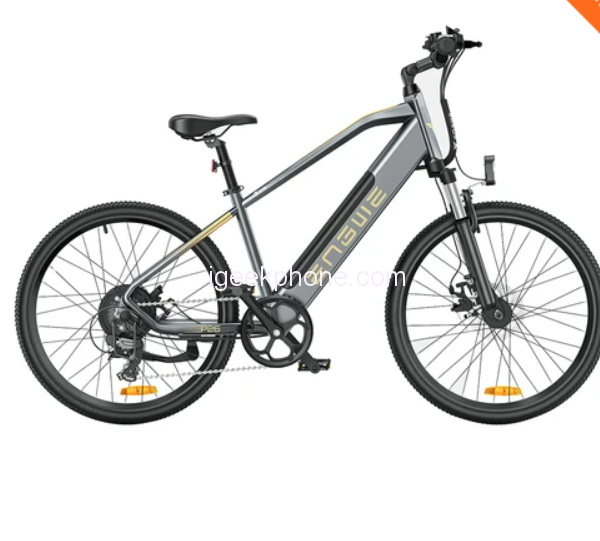
- ENGWE P26 Mountain Bike
ENGWE P26 Mountain Bike
Offers
-
 ENGWE P26 Mountain Bike
$1099.99
ENGWE P26 Mountain Bike
$1099.99
View Offer
Highlights
1. Front suspension mountain e-bike brings you a comfortable ride, enjoy mile after mile.
2. Accelerate swiftly and slope roads with a powerful 500W hub motor, 40-45km max speed, riding with your speed.
3. Equipped with Shimano 7-speed gear, ENGWE P26 will give you more riding pleasure.
4. 48V 13.6Ah battery can provide as long as 86km mileage in power assist mode, never worry about the range, ride anywhere you want.
5. 26*1.96 rubber tires, can ride on mountainous terrain, also freely shuttle in urban.
Specification
| General | Brand: ENGWE Type: E-bike Model: ENGWE P26 Color: Grey |
| Specification | Max Speed: 40-45km/h Assisted Speed: 35km/h Pure Electric Range: 40km Max Assisted Range: 86km Max Climbing: 7 degree Max Load: 100kg Suitable Height: 155-210cm Motor: 48V 500W Front Suspension: Mechanical Suspension Transmission: Shimano 7-speed Gear Battery: 48V 13.6Ah Charging Time: 5h Charger: 100-240V Brake: Mechanical Brake Headlight: LED Headlight Tire: 26*1.95” Mountain Road Tire Meter: 80*50mm LCD |
| Weight & Size | Product Weight: 26.2kg Package Weight: 36kg Product Size(L x W x H): 173 x 63 x 112cm Package Size(L x W x H): 145 x 25 x 82cm |
| Package Contents | 1 x ENGWE P26 electric bicycle 1 x Charger 1 x User Manual 1 x Tools |
Reviews
Sorry, you have not permission to write review for this product.
Disclaimer Note
You can write your own disclaimer from APS Settings -> General -> Disclaimer Note.
More Products from OPPO


New Arrivals






ADVERTISE



