
|

|
Trending
- Vidda C5 Pro Review: A 4K Projector for Home Cinema and Gaming
- iBUYPOWER AI Halo Mini PC Debuts With Ryzen AI Max+ PRO 495
- Honor WIN 2 Gaming Phones and Tablet Expected to Debut in October
- UK Cryptocurrency Adoption Grows as More Britons Invest in Digital Assets
- Redmi Phone Storage Full? How to Safely Remove Junk Files
- C48Pro Smartwatch: What Can You Do on a 2.01-Inch Screen?
- JNR Bykux 59K vs JNR Lion King Shisha 65K Review: Key Differences Explained
- Maskking Malux 50K Screen Guide: Understanding Battery and E-Liquid Indicators

 |
 |
 |
 |
 |
 |
- Shop
- E-cigar NEW
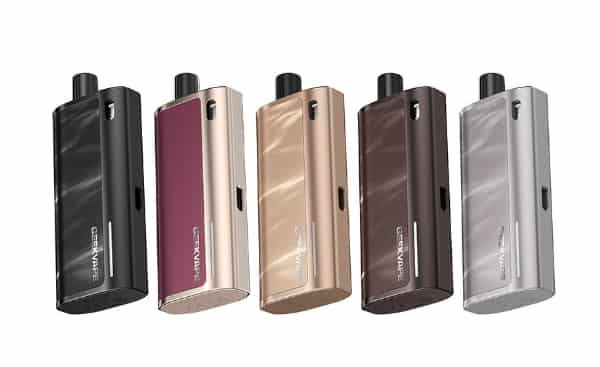
- Geekvape Peak 2 Pod System Kit
Geekvape Peak 2 Pod System Kit
Offers
-
Geekvape Peak 2 Pod System Kit
View Offer
Features:
1. 1600mAh Battery with 2A Fast Charging – Stay powered all day with quick top-ups
2. Visible E-liquid Window – Easily monitor juice level at a glance
3. LED Power Display – Real-time battery indicator for added control
4. Three-Level Airflow Adjustment – Customize your MTL draw precisely
5. Compatible with Peak Cartridge (0.8ohm) – Delivers rich flavor and smooth vapor
6. Premium Leather Material – Comfortable grip with luxury aesthetics
7.Compact & Pocket-Friendly – Stylish and lightweight for daily carry
Brand: Geekvape
Unit: 1Set
Color Options: Varies by region
Battery Capacity: 1600mAh (built-in)
Output Power: Max 20W
Charging Port: Type-C, 5V/2A fast charging
E-liquid Capacity: 4ml (compatible with Peak Cartridge)
Coil Resistance: 0.8ohm (Peak Cartridge)
Airflow: 3-Level Adjustable MTL airflow
Materials: Premium leather, zinc alloy
Display: Real-time LED battery indicator
Filling Method: top-fill
Activation: Auto-draw
Each set contain:
1pc Geekvape Peak 2 Device (1600mAh)
1pcs Peak Cartridge 4ml 0.8ohm (pre-installed)
1pcs Peak Cartridge 4ml 0.8ohm (spare)
1pc Type-C Cable
1pc User Manual
Reviews
Sorry, you have not permission to write review for this product.
Disclaimer Note
You can write your own disclaimer from APS Settings -> General -> Disclaimer Note.
New Arrivals






ADVERTISE



