
|

|
Trending
- Nothing Headphone (1) Pro Launches with Triple Drivers, 46dB ANC and 68-Hour Battery Life
- Garmin MARQ Gen 3 Surfaces on Official Support Pages, Hinting at a New Premium Sports Watch
- Honor WIN Tablet Opens for Reservations with a 240Hz OLED Display and Snapdragon 8 Elite Gen 5
- OnePlus 16 Debuts with Snapdragon 8 Elite Extreme Gen 6 and 185FPS Gaming
- Unboxing the OXVA XLIM 4: Pocket Luxury, Serious Stamina
- OXVA XLIM 4 First Look: Pure Pocket Luxury
- What Does 58,000 Puffs Actually Mean? Understanding Vape Puff-Count Claims
- JNR Falcon Crest 58K Review: A Perfume-Inspired Refillable Vape with a Transparent Tank

 |
 |
 |
 |
 |
 |
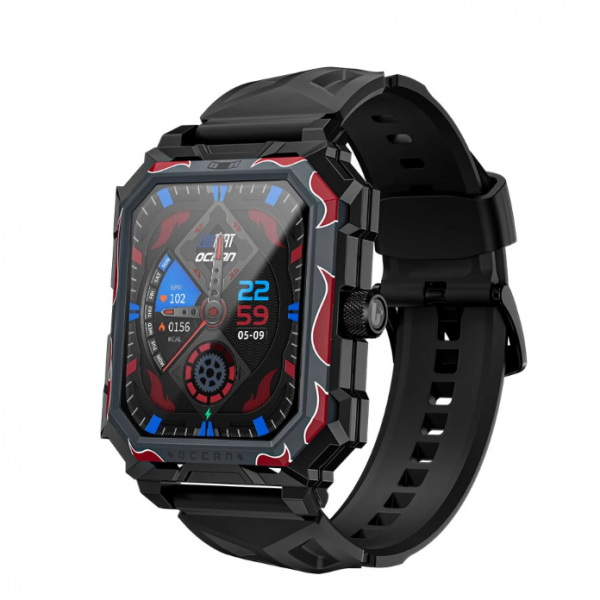
LOKMAT OCEAN MAX Smartwatch
Offers
-
 LOKMAT OCEAN MAX Smartwatch
$30.99
LOKMAT OCEAN MAX Smartwatch
$30.99
View Offer
-
Specification Brand LOKMAT Model OCEAN MAX bluetooth Version BT5.3 Compatible OS Android 5.0 and above,IOS 10.0 and above, support bluetooth 5.0 Operating Mode Full Touch System Language Chinese, Hebrew, English, German, Arabic, Spanish, Thai, French, Russian, Korean, Vietnamese, Malay, Portuguese APP Language Simplified Chinese, Traditional Chinese, English, Russian, Indonesian, German, Italian, Czech, Japanese, French, Polish, Portuguese, Spanish, Arabic, Korean Special Features Information Reminder bluetooth Call Call Reminder Message Reminder APP Notification Health Heart Rate Monitor Blood Pressure Monitor Blood Oxygen (SpO2) Monitor Sedentary Alarm Sleep Monitor Exercise and Record Multiple Sports Modes Calorie Distance Step Count Application Music Control Camera Control Alarm Clock Stopwatch Weather Custom Dial Dial Market Brightness Adjustment Find Phone Do Not Disturb Mode Technical Parameters Screen Size: 1.96 inch Resolution: 320*386 pixels Battery Battery Capacity: 650mAh Standby Time: About 15-20 days
Using Time: About 5-7 daysCharging Time: About 2-3 hours Charging Type: Magnetic charging Appearance & Details Material Band Material: Air Rubber Watch Case Material: Powder Metallurgy Size Dial SIze: About 59*46*12.5mm Strap Length: About 130mm
Band Width: About 22mm
Packing List 1* LOKMAT OCEAN MAX Smart Bracelet 1* Charging Cable 1* User Manual
Reviews
Sorry, you have not permission to write review for this product.
Disclaimer Note
You can write your own disclaimer from APS Settings -> General -> Disclaimer Note.


New Arrivals




ADVERTISE



