
|

|
Trending
- OneOdio Studio Max 2 Review – DJ Freedom Without the Wireless Compromise
- MAXRAY RUSH 80K Review – More Than Just a Puff Count: Meet the Disposable That Controls Its Own E-Liquid
- Vidda C5 Pro Review: A 4K Projector for Home Cinema and Gaming
- iBUYPOWER AI Halo Mini PC Debuts With Ryzen AI Max+ PRO 495
- Honor WIN 2 Gaming Phones and Tablet Expected to Debut in October
- UK Cryptocurrency Adoption Grows as More Britons Invest in Digital Assets
- Redmi Phone Storage Full? How to Safely Remove Junk Files
- C48Pro Smartwatch: What Can You Do on a 2.01-Inch Screen?

 |
 |
 |
 |
 |
 |
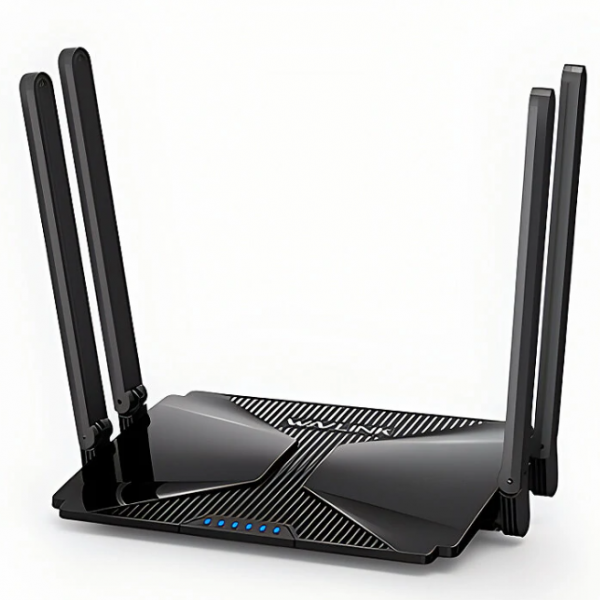
Wavlink MIGHTY EX1 AX3000 WiFi 6 Router
-
Processor
-
RAM
-
Storage
-
Display
-
Camera
-
Operating System
Offers
-
 Wavlink MIGHTY EX1 AX3000 WiFi 6 Router
$59.99
Wavlink MIGHTY EX1 AX3000 WiFi 6 Router
$59.99
View Offer
Specifications:
| Brand | Wavlink |
| Name | AX3000 Dual-Band Mesh Router |
| Model | MIGHTY EX1 |
| Wireless frequency | 2.4GHz&5GHz |
| Wireless rate | 2976Mbps |
| Network port | Gigabit WAN port*1+Gigabit LAN port*2 |
| Button | Reset & Pairing Button |
| Antenna | 4 high-gain omnidirectional antennas |
| Memory size | 2GB |
| Product size | 175x 125 X 34mm |
Features:
– Supports 160MHz bandwidth and 1024-QAM for much faster wireless connections.
– Supports MU-MIMO & OFDMA technique to simultaneously communicate with multiple devices in a very effective way.
– Supports TWT (Target Wakeup Time) technology to save power consumption.
– Provides a total networking speed of about 2976Mbps with 2402Mbps@5GHz and 574Mbps@2.4GHz.
– Features four 5dBi patented antennas that are powerful, omni-directional, foldable and fitting in smaller box.
– Provides 1 x Gigabit WAN + 2 x Gigabit LAN (1000Mbpjs) for high-speed wired Internet.
– Protects network security with up to WPA2/WPA3-PSK MIX.
– Support IPV4 / IPV6.
– Sets up in minutes with the APP or Web UI, easily manage WiFi settings and monitor data usage.
– Compatible with our AX3000 and AX6000 Mesh WiFi systems for seamless roaming and whole-home coverage.
Package Includes:
1x WiFi 6 AX3000 Mesh Router
1x DC 12V/1A Power Adapter
1x Ethernet Cable
1x Manual
Reviews
Sorry, you have not permission to write review for this product.
Disclaimer Note
You can write your own disclaimer from APS Settings -> General -> Disclaimer Note.



New Arrivals





ADVERTISE



