
|

|
Trending
- Honor WIN Tablet Opens for Reservations with a 240Hz OLED Display and Snapdragon 8 Elite Gen 5
- OnePlus 16 Debuts with Snapdragon 8 Elite Extreme Gen 6 and 185FPS Gaming
- Unboxing the OXVA XLIM 4: Pocket Luxury, Serious Stamina
- OXVA XLIM 4 First Look: Pure Pocket Luxury
- What Does 58,000 Puffs Actually Mean? Understanding Vape Puff-Count Claims
- JNR Falcon Crest 58K Review: A Perfume-Inspired Refillable Vape with a Transparent Tank
- OXVA XLIM 4 vs XLIM 3 Ultra: Should Existing Owners Upgrade?
- NEXA Ultra II vs Puffeel Aster 50K Review: How Their 50K-Class Designs Compare

 |
 |
 |
 |
 |
 |
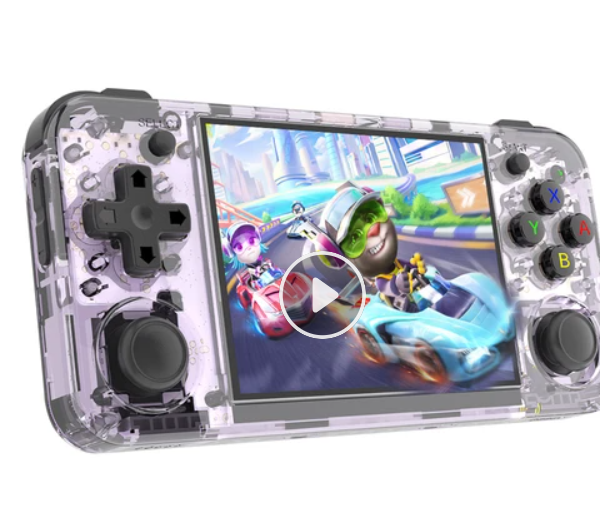
ANBERNIC RG35XX H Game Console
-
Processor
-
RAM
-
Storage
-
Display
-
Camera
-
Operating System
Offers
-
 ANBERNIC RG35XX H Game Console
$ 74.99
ANBERNIC RG35XX H Game Console
$ 74.99
View Offer
- H700 quad-core ARM Cortex-A53, 1.5GHz frequency
- 3.5-inch IPS Display
- 640*480 Resolution
- 3300mAh Battery with 8 Hours of Playtime
- 5000+ Games Pre-installed
- HDMI Output
- Vibration Motor
- Moonlight Streaming
H700 quad-core ARM Cortex-A53
Anbernic RG35XX H is powered by H700 quad-core ARM Cortex-A53 processor, allowing you to play most of the retro games on its 3.5” IPS display.
Dual-core G31 MP2 GPU
Combined with Dual-core G31 MP2 GPU and the 1GB LPDDR4 RAM is more than enough for the OS and emulator for the gaming consoles it supports.
3.5” IPS display
The 3.5” IPS display runs at a 640×480 resolution, perfect for retro gaming.
8 Hours of Play Time
With the 3000mAh rechargeable battery inside the retro gaming handheld, you get up to 8 hours of battery life depending on the emulator you are playing.
Multi Game Formats
Support ported games, PSP, PS1, DC, NDS, ARCADE, GBA, GBC, GB, SFC, FC, MAME, MD, GG, PCE, NGPC, SMS, WSC and more.
Portable
Measuring only 14.5 x 6.9 x 1.6cm and weighing just 180g, the RG35XX H is very light and portable, fitting into a pocket or small bag.
Specs
General
Hardware
Display
Camera
Network
OS
Other Features
Battery
Dimensions and Weight
Reviews
Sorry, you have not permission to write review for this product.
Disclaimer Note
You can write your own disclaimer from APS Settings -> General -> Disclaimer Note.
More Products from Umidigi
New Arrivals




ADVERTISE



