
|

|
Trending
- HPI Stage-D10 Review: A Mustang RC Drift Car Built for Skill and Customization
- HOVERAir VERSA Review: A Pocket Gimbal Camera That Can Take Flight
- DaranEner NEOZ2 Review: Is This 300W Portable Power Station Worth Buying?
- PowerAlgo Expands Global Cloud Mining Services With a Focus on Bitcoin Mining and Renewable Energy
- OneOdio Studio Max 2 Review – DJ Freedom Without the Wireless Compromise
- MAXRAY RUSH 80K Review – More Than Just a Puff Count: Meet the Disposable That Controls Its Own E-Liquid
- Vidda C5 Pro Review: A 4K Projector for Home Cinema and Gaming
- iBUYPOWER AI Halo Mini PC Debuts With Ryzen AI Max+ PRO 495

 |
 |
 |
 |
 |
 |
- Shop
- Accessories
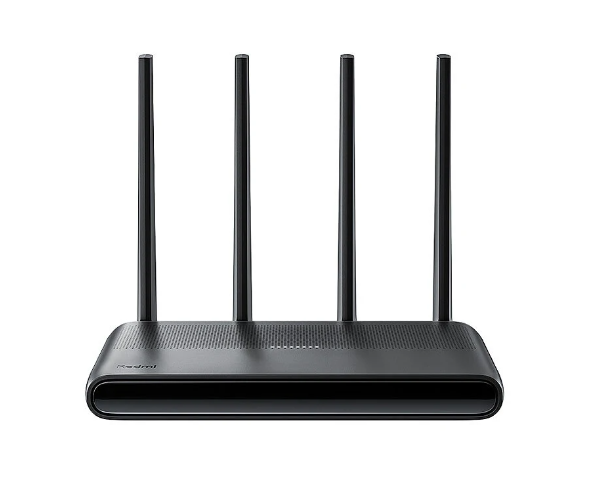
- Xiaomi Redmi AX6000 WiFi 6 Router
Xiaomi Redmi AX6000 WiFi 6 Router
-
Processor
-
RAM
-
Storage
-
Display
-
Camera
-
Operating System
Offers
-
 Redmi AX6000 WiFi 6 Router
$103.99
Redmi AX6000 WiFi 6 Router
$103.99
View Offer
Specifications:
| Brand | Xiaomi Redmi |
| Model | AX6000 |
| Processor | MT 7986A Quad-Core 2.0GHz CPU |
| Memory | 512MB |
| 2.4G Wi-Fi | 4×4 (supports up to IEEE 802.11ax protocol, maximum speed of 1148Mbps) |
| 5G Wi-Fi | 4×4 160MHz(supports up to IEEE 802.11ax protocol, maximum speed of 4804Mbps) |
| External Antenna | 4 |
| Interface | 4 auto MDI/MDIX adaptive 10/100/1000M WAN/LAN ports |
| Working Temperature | 0~ 40 °C, |
| Working Hudmidity | 10%~90% humidity (non-condensing) |
| Storage Temperature | -40~ 70 °C |
| Storage Humidity | 5% ~ 90% humidity (non-condensing) |
Features:
1. High-Performance CPU: Empowered by a Quad-Core 2.0GHz CPU for efficient processing.
2. Superior Speeds: With 2.4G and 5G dual bands, enjoy Wi-Fi speed up to 4804Mbps.
3. External antennas: 4 external antennas to provide a robust and reliable Wi-Fi connection.
4. Seamless Connection: Support for Mesh networking ensures a stable and seamless internet connection.
5. Multiple Interfaces: Comes with 4 autoadaptative WAN/LAN ports for versatile connectivity.
Package Include:
1x Xiaomi Redmi AX6000 router
1x Power Cable
1x Network Cable
1x Manual
Reviews
Sorry, you have not permission to write review for this product.
Disclaimer Note
You can write your own disclaimer from APS Settings -> General -> Disclaimer Note.
New Arrivals






ADVERTISE



