
|

|
Trending
- OneOdio Studio Max 2 Review – DJ Freedom Without the Wireless Compromise
- MAXRAY RUSH 80K Review – More Than Just a Puff Count: Meet the Disposable That Controls Its Own E-Liquid
- Vidda C5 Pro Review: A 4K Projector for Home Cinema and Gaming
- iBUYPOWER AI Halo Mini PC Debuts With Ryzen AI Max+ PRO 495
- Honor WIN 2 Gaming Phones and Tablet Expected to Debut in October
- UK Cryptocurrency Adoption Grows as More Britons Invest in Digital Assets
- Redmi Phone Storage Full? How to Safely Remove Junk Files
- C48Pro Smartwatch: What Can You Do on a 2.01-Inch Screen?

 |
 |
 |
 |
 |
 |
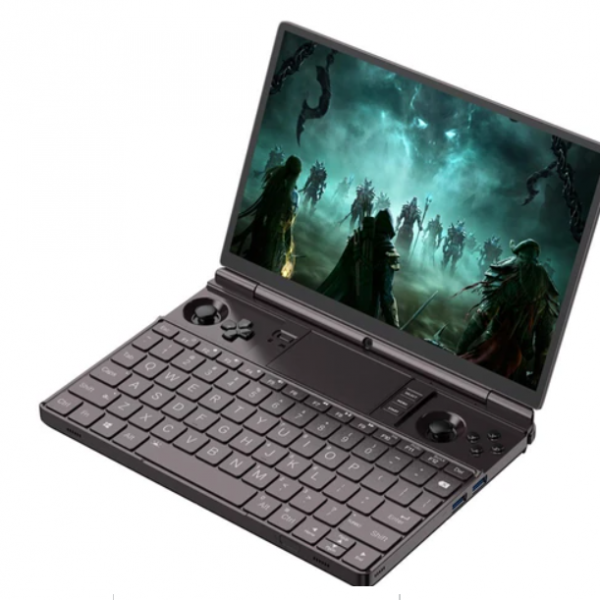
GPD WIN Max 2 2023
Offers
-
 GPD WIN Max 2 2023
$ 1409.99
GPD WIN Max 2 2023
$ 1409.99
View Offer
Highlights
Powerful Performance
Equipped with an AMD Ryzen 7 7840U processor 8 cores 6 threads, base 3.3GHz, Max 5.1GHz and AMD Radeon 780M GPU, the GPD WIN 2 2023 delivers high-performance gaming capabilities, allowing for smooth gameplay and multitasking.
High-Quality Display
The handheld gaming laptop features a 10-point touch control, 1920×1200 default resolution (with a maximum of 2560×1600), providing crisp and immersive visuals for an enhanced gaming experience.
Ample Storage and Memory
With 64GB of LPDDR5x RAM and a 2TB M.2 NVMe SSD (PCIe Gen4), the GPD WIN 2 2023 offers ample storage space for games, applications, and multimedia content, ensuring fast and efficient data access.
Versatile Connectivity
The gaming laptop supports various connectivity options, including Wi-Fi 6, Bluetooth 5.2, USB4, USB 3.2 Gen 2 Type-C, USB 3.2 Gen 2 Type-A, HDMI, and SD card slots, allowing for seamless data transfer, peripheral connections, and external display support.
Portable and Long-Lasting
Weighing just 1.005kg, the GPD WIN 2 2023 is highly portable and designed for on-the-go gaming. The 67Wh Li-polymer battery provides up to 3 hours of heavy use, 6-8 hours of moderate use, or 14 hours of light use, ensuring extended gaming sessions without worrying about battery life.
Reviews
Sorry, you have not permission to write review for this product.
Disclaimer Note
You can write your own disclaimer from APS Settings -> General -> Disclaimer Note.
More Products from Xiaomi
New Arrivals






ADVERTISE



