
|

|
Trending
- JNR Falcon Crest 58K Review: A Perfume-Inspired Refillable Vape with a Transparent Tank
- OXVA XLIM 4 vs XLIM 3 Ultra: Should Existing Owners Upgrade?
- NEXA Ultra II vs Puffeel Aster 50K Review: How Their 50K-Class Designs Compare
- Vaporesso PRIX Kit vs XROS 6 Review: Battery Life, Pod Design and Everyday Differences
- Blackview XPLORE 6 Leaks Reveal Key Specs of a Rugged Flagship Phone
- Exploring Risk Management through Futures: Delving into Hedging and Speculation
- The Psychology of Gambling: Understanding the Mindset behind Risk-taking and Addiction
- How to Enable the System Performance Monitor Window on Xiaomi Phones?

 |
 |
 |
 |
 |
 |
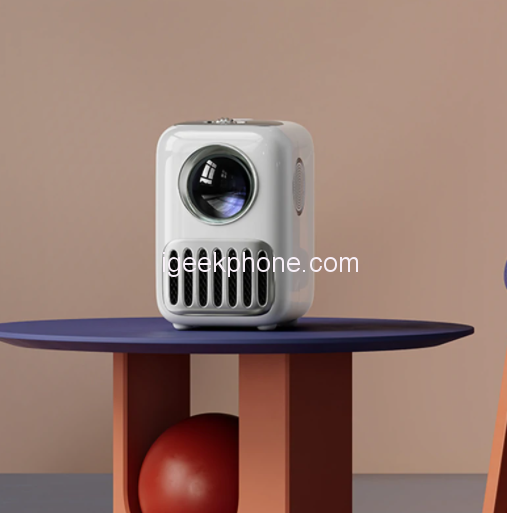
Wanbo T2R Max Smart Projector
-
Processor
-
RAM
-
Storage
-
Display
-
Camera
-
Operating System
Offers
-
 Wanbo T2R Max Smart Projector
$185.99
Wanbo T2R Max Smart Projector
$185.99
View Offer
Description:
【Side projection】
Auto up-down keystone correction can support side projection,you can put the projector anywhere at will
【Physical 1080P+350ANSI Lumens】
Ultra-high-definition portrait, color enhancement, restore the most realistic video picture
【Android 9.0】
Comes with Youtube, Netflix, Google play store, Twitter, Facebook APP etc.
| T2Max | T2R Max | T6max | |
| Android | Android 9.0 TV | Android 9.0 TV | Android 9.0 TV |
| WIFI | 2.4G Hz | 2.4G Hz | 2.4G Hz 5G Hz |
| Bluetooth | Bluetooth 4.0 | Bluetooth 4.0 | Bluetooth 5.0 |
| Standard resolution | 1920*1080 | 1920*1080 | 1920*1080 |
| Maximum resolution | 1920*1080 | 4K | 4K |
| ANSI Lumens | 250 ANSI lumens | 350 ANSI lumens | 550 ANSI Lumens |
| Focus Method | Manual | Manual | Electric |
| Keystone correction | 4-point correction | Auto Up-down correction 4-point correction |
Auto Up-down correction 4-point correction |
| CPU Amlogic | MTK 9255 | MTK 9269 | Amlogic T972 |
| RAM | 1GB | 1GB | 2GB |
| Storage Built-in | 16GB | 16GB | 16GB |
| Projection technology | LCD | LCD | LCD |
| Light Source | LED | LED | LED |
| Projection ratio | 1.35:1 | 1.35:1 | 1.35:1 |
| Projection scale | 16:9 4:3 |
16:9 4:3 |
16:9 4:3 |
| Speaker | 3W*2 | 3W*2 | 5W*2 |
Specs
General
Hardware
Display
Camera
Network
OS
Other Features
Battery
Dimensions and Weight
Reviews
Sorry, you have not permission to write review for this product.
Disclaimer Note
You can write your own disclaimer from APS Settings -> General -> Disclaimer Note.
More Products from Ulefone
New Arrivals




ADVERTISE



