
|

|
Trending
- Honor WIN Tablet Opens for Reservations with a 240Hz OLED Display and Snapdragon 8 Elite Gen 5
- OnePlus 16 Debuts with Snapdragon 8 Elite Extreme Gen 6 and 185FPS Gaming
- Unboxing the OXVA XLIM 4: Pocket Luxury, Serious Stamina
- OXVA XLIM 4 First Look: Pure Pocket Luxury
- What Does 58,000 Puffs Actually Mean? Understanding Vape Puff-Count Claims
- JNR Falcon Crest 58K Review: A Perfume-Inspired Refillable Vape with a Transparent Tank
- OXVA XLIM 4 vs XLIM 3 Ultra: Should Existing Owners Upgrade?
- NEXA Ultra II vs Puffeel Aster 50K Review: How Their 50K-Class Designs Compare

 |
 |
 |
 |
 |
 |
- Shop
- Accessories
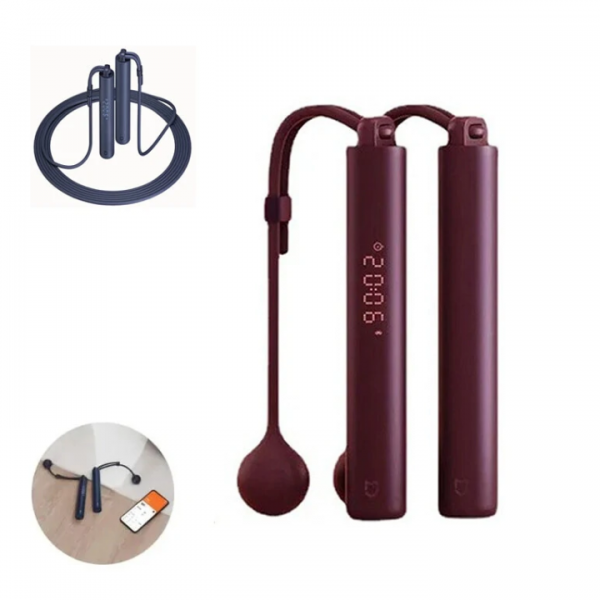
- Xiaomi Mijia Smart Electric Skipping Rope
Xiaomi Mijia Smart Electric Skipping Rope
-
Processor
-
RAM
-
ROM
-
Display
-
Camera
-
OS
Offers
-
 Xiaomi Mijia Smart Electric Skipping Rope
$26.99
Xiaomi Mijia Smart Electric Skipping Rope
$26.99
View Offer
Specifications:
| Brand | Xiaomi |
| Color | Red |
| Length | 3m |
| bluetooth | V5.0 |
| Handle size | 162.2*25*25mm |
| Net weight | About 180g (Handle and air swing ball) |
| Battery Capacity | 200mAh |
| Material | PC |
| Input | 5V-0.5A |
| Charge Port | Type-C |
Features:
1. Smart Jumping: Equipped with a built-in intelligent chip, it accurately counts your jumps, calories burned, and exercise time.
2. Adjustable Length: The rope can be easily adjusted to fit different heights, making it suitable for all family members.
3. Ergonomic Design: The handle grip is made of anti-slip material, ensuring a comfortable and firm hold during workouts.
4. Tough and Lightweight: Made of high-quality materials, the jump rope is tough and lightweight, perfect for carrying it on the go.
5. Smart App Integration: Connect the jump rope to your smartphone via Bluetooth to track your fitness progress and set personalized goals.
Package includes:
2 x Handle
1 x 3m Sports Rope
2 x Air Flick
1 x Storage Bag
1 x User Manual
Reviews
Sorry, you have not permission to write review for this product.
Disclaimer Note
You can write your own disclaimer from APS Settings -> General -> Disclaimer Note.

New Arrivals





ADVERTISE



