
|

|
Trending
- How to Manage the UK Vape Tax in 2026: Practical Ways to Control Your Costs
- GEEK BAR PULSE 2 25K Halloween Edition: New Flavors and Features Explained
- Ireland Increases Cigarette Taxes as Vape Liquid Duty Set to Rise 40% in 2027
- Xiaomi Smart Door Lock 5C Cat Eye Edition Debuts With 160° Camera and 3.5-Inch Indoor Screen
- Social Gaming and Social Casinos: Understanding the Player Dynamics
- Honor WIN 2 Phones and WIN Gaming Tablet Tipped for October Launch
- 6 tips to find someone’s email with a phone number
- iBUYPOWER Pro AMD AI Halo Mini PC Launches With Ryzen AI Max+ PRO 495 and 10GbE

 |
 |
 |
 |
 |
 |
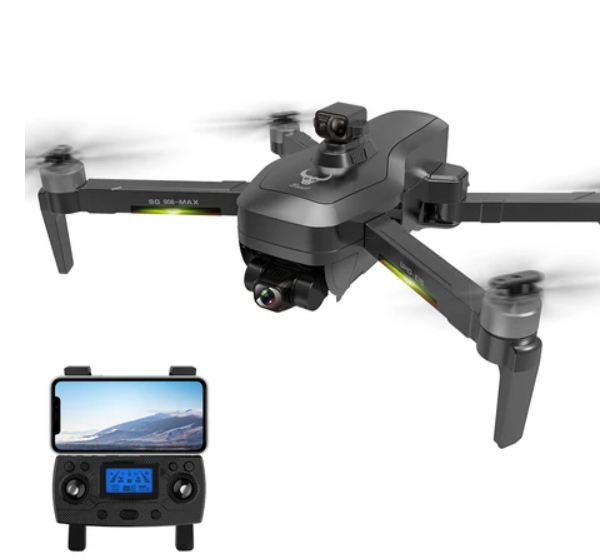
ZLL SG906 MAX Beast 3 RC Drone
-
Processor
-
RAM
-
Storage
-
Display
-
Camera
-
Operating System
Offers
-
 ZLL SG906 MAX Beast 3 RC Drone
$ 191.99
ZLL SG906 MAX Beast 3 RC Drone
$ 191.99
View Offer
Highlights
Stunning 4K Ultra HD Images
With the help of 5G WIFI, real-time video can be obtained from the drone camera without delay, the longest control distance can reach 1200 meters, and the longest image transmission distance can reach 800 meters. Flying through the air has never been more stunning with 4K UHD super-resolution.
Three-axis Gimbal and EIS
The three-axis mechanically stabilized gimbal + EIS electronic anti-shake effect brings more effective anti-shake effect, easily filtering out image vibration caused by the outside world while ensuring image quality.
360° Obstacle Avoidance
When the quadcopter detects an obstacle or obstacle ahead, it will automatically bypass it. Such smart design greatly reduces the possibility of damage to the drone.
3 Return Modes
Beast 3 has multiple return-to-home functions. Automatically record starting position before takeoff. When automatic return to home is required, the intelligent return to home mode is automatically implemented. When the battery power is lower than about 25% or the remote control loses signal, it will automatically return to home.
Reviews
Sorry, you have not permission to write review for this product.
Disclaimer Note
You can write your own disclaimer from APS Settings -> General -> Disclaimer Note.
New Arrivals





ADVERTISE



