
|

|
Trending
- Vidda C5 Pro Review: A 4K Projector for Home Cinema and Gaming
- iBUYPOWER AI Halo Mini PC Debuts With Ryzen AI Max+ PRO 495
- Honor WIN 2 Gaming Phones and Tablet Expected to Debut in October
- UK Cryptocurrency Adoption Grows as More Britons Invest in Digital Assets
- Redmi Phone Storage Full? How to Safely Remove Junk Files
- C48Pro Smartwatch: What Can You Do on a 2.01-Inch Screen?
- JNR Bykux 59K vs JNR Lion King Shisha 65K Review: Key Differences Explained
- Maskking Malux 50K Screen Guide: Understanding Battery and E-Liquid Indicators

 |
 |
 |
 |
 |
 |
- Shop
- Accessories
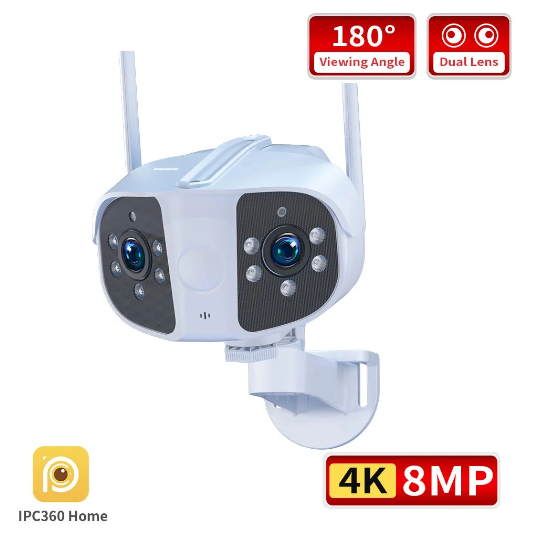
- Guudgo 4K 6MP/8MP WiFi PTZ Camera
Guudgo 4K 6MP/8MP WiFi PTZ Camera
Offers
-
 Guudgo 4K 6MP/8MP WiFi PTZ Camera
$38.99
Guudgo 4K 6MP/8MP WiFi PTZ Camera
$38.99
View Offer
Specifications:
Brand: Guudgo
Resolution: 4K 6MP (4096X1280) and 4K 8MP (4608X1440)
Lens: Dual lens, horizontal 180 degree wide angle
Network: Supports wired or wireless connections
Lighting: 6 dot matrix infrared light and 6 dot matrix white light
Storage: Built in TF card storage, supporting up to 128GB; Support cloud storage
Video Compression: Smart H.264
Mobile/Tablet Monitoring: Supports iOS, Android, for Harmonny OS
Suitable for outdoor use
Lighting protection standard: GB/T17626.5 and international standard IEC61000-4-5
Features:
1. High definition resolution providing clear and delicate images.
2. Wide angle lens offering a panoramic monitoring scope.
3. PTZ functionality enabling it to tilt and zoom for better coverage.
4. Supports 2D/3D noise reduction and digital wide dynamic.
5. Equipped with advanced smart H.264 video compression technology which maintains high-definition image quality at ultra-low bit rates.
Package Includes:
1 x Camera
1 x Power Adapter(EU)
1 x User Manual
1 x Screw Package
1 x Waterprooflid
Reviews
Sorry, you have not permission to write review for this product.
Disclaimer Note
You can write your own disclaimer from APS Settings -> General -> Disclaimer Note.
More Products from Xiaomi


New Arrivals






ADVERTISE



